

About
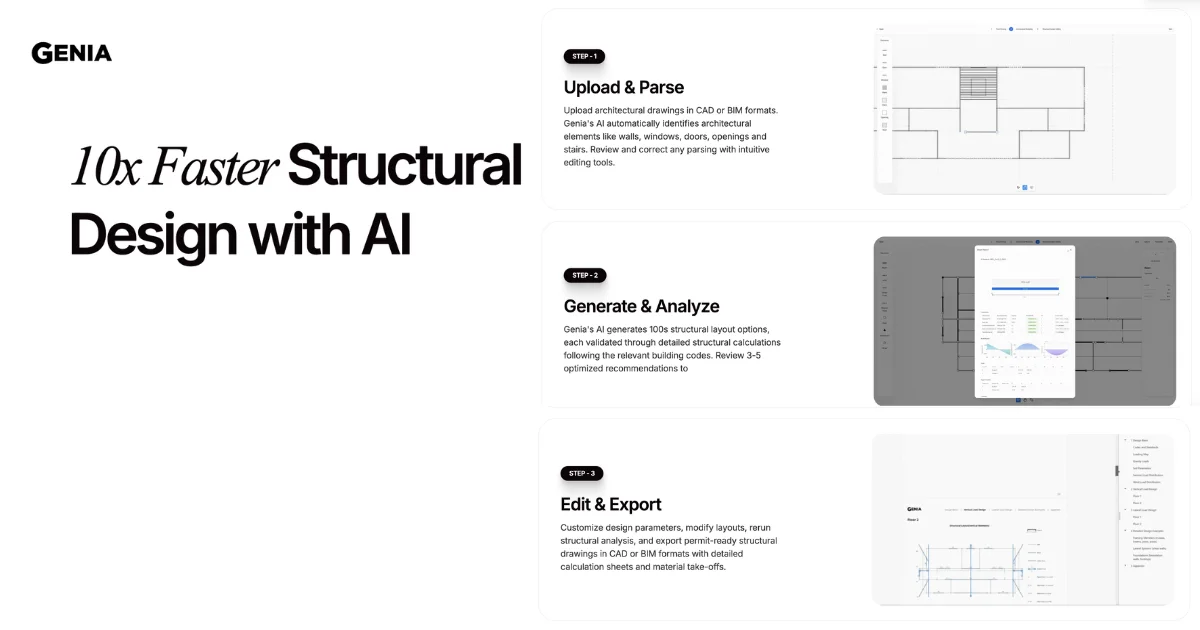
Genia is a Structural AI Agent that radically accelerates the structural engineering workflow. By uploading architectural drawings in CAD or BIM formats, engineers trigger an AI pipeline that automatically parses architectural elements—walls, windows, doors, openings, and stairs—then generates hundreds of physics-validated structural layout options in minutes. Each option is validated against relevant building codes and evaluated for cost-performance balance. Genia integrates with the ASCE API to pull up-to-date environmental load data, ensuring compliance with current standards. The platform's material optimization engine identifies the best materials to meet force requirements while minimizing overdesign, typically achieving 20% savings on construction materials. Once a layout is selected, engineers can customize design parameters, modify layouts, rerun structural analysis, and export permit-ready drawings in CAD or BIM formats complete with detailed calculation sheets and material takeoffs. Built-in team collaboration features support multi-user editing, reviewing, and stamping workflows. Genia is ideal for structural engineering firms, principal engineers (PEs), and SE directors working on residential, commercial, or retrofit projects. Whether stress-testing impacts to existing structures or delivering permit packages in hours instead of days, Genia dramatically compresses the design cycle while improving material efficiency and code compliance.
Key Features
- AI Architecture Parser: Automatically identifies and extracts key architectural elements—walls, windows, doors, openings, and stairs—from uploaded CAD or BIM drawings, with intuitive tools to review and correct parsing.
- 100s of Structural Layout Options: Generates hundreds of structural layout options in minutes, each validated through detailed structural calculations per relevant building codes, then surfaces the top 3–5 for optimal cost-performance balance.
- ASCE API Integration: Connects to the ASCE API to obtain current environmental load factors, ensuring every design option meets up-to-date standards for wind, seismic, and snow loads.
- Material Optimization Engine: Analyzes force requirements and recommends the most efficient materials, consistently delivering approximately 20% savings on construction materials without sacrificing structural performance.
- Permit-Ready Export with Calculation Sheets: Exports finalized designs as permit-ready structural drawings in CAD or BIM formats, bundled with detailed calculation sheets and full material takeoffs for immediate submittal.
Use Cases
- Structural engineering firms converting architectural drawings into permit-ready structural packages in hours instead of weeks.
- Principal engineers stress-testing retrofit projects to analyze the impact on existing structures before committing to a design.
- Developer clients working with structural engineers to reduce material costs by 15–20% on new construction without sacrificing performance.
- Multi-disciplinary teams enabling structural and mechanical engineers to collaborate more efficiently on complex building projects.
- Small structural practices leveraging AI to take on more projects simultaneously without proportionally scaling headcount.
Pros
- Dramatic Time Savings: Compresses the structural design workflow by up to 10x, enabling engineers to deliver permit-ready packages in hours rather than days or weeks.
- Significant Material Cost Reduction: The AI-driven material optimization consistently achieves ~20% savings on structural materials, providing clear ROI for clients and firms alike.
- Code-Compliant Automated Analysis: Every generated design option is validated against building codes with ASCE integration, reducing the risk of compliance errors and rework.
- Collaborative Team Workflows: Built-in multi-user editing, review, and stamping features make it easy for structural and mechanical engineers to collaborate within a single platform.
Cons
- Credit-Based Pricing Can Add Up: Projects consume credits, and high-volume firms may find the Professional or Team tiers limiting, requiring additional credit purchases or an Enterprise plan.
- Specialized Use Case: Genia is purpose-built for structural engineering; it offers limited utility outside of building structure design workflows.
- API Integration Limited to Enterprise: Full API access and private AI model deployment are only available on the custom Enterprise plan, making deeper integrations inaccessible on lower tiers.
Frequently Asked Questions
What file formats does Genia support for input and output?
Genia accepts architectural drawings in CAD and BIM formats for upload, and exports permit-ready structural drawings in the same CAD and BIM formats, along with detailed calculation sheets and material takeoffs.
How does Genia ensure structural designs are code-compliant?
Every design option generated by Genia is validated through detailed structural calculations based on relevant building codes. Genia also integrates with the ASCE API to automatically pull current environmental load factors such as wind, seismic, and snow data.
Is there a free plan available?
Yes. Genia offers a free tier that includes 100 one-time credits, access to multiple design options, design editing, structural drawings, and calculation reports—no credit card required to get started.
What does the credit system mean — how many credits does a project use?
Genia charges by outcome, meaning you consume credits when you create a project to design. The specific credit cost per project depends on complexity; the free plan includes 100 one-time credits, Professional plans include 500/month, and Team plans include 2,000/month.
Can multiple engineers collaborate on the same project in Genia?
Yes. Genia's Team and Enterprise plans include collaborative editing, design review, and stamping workflows that allow multiple engineers to work together within a single project environment.