
About
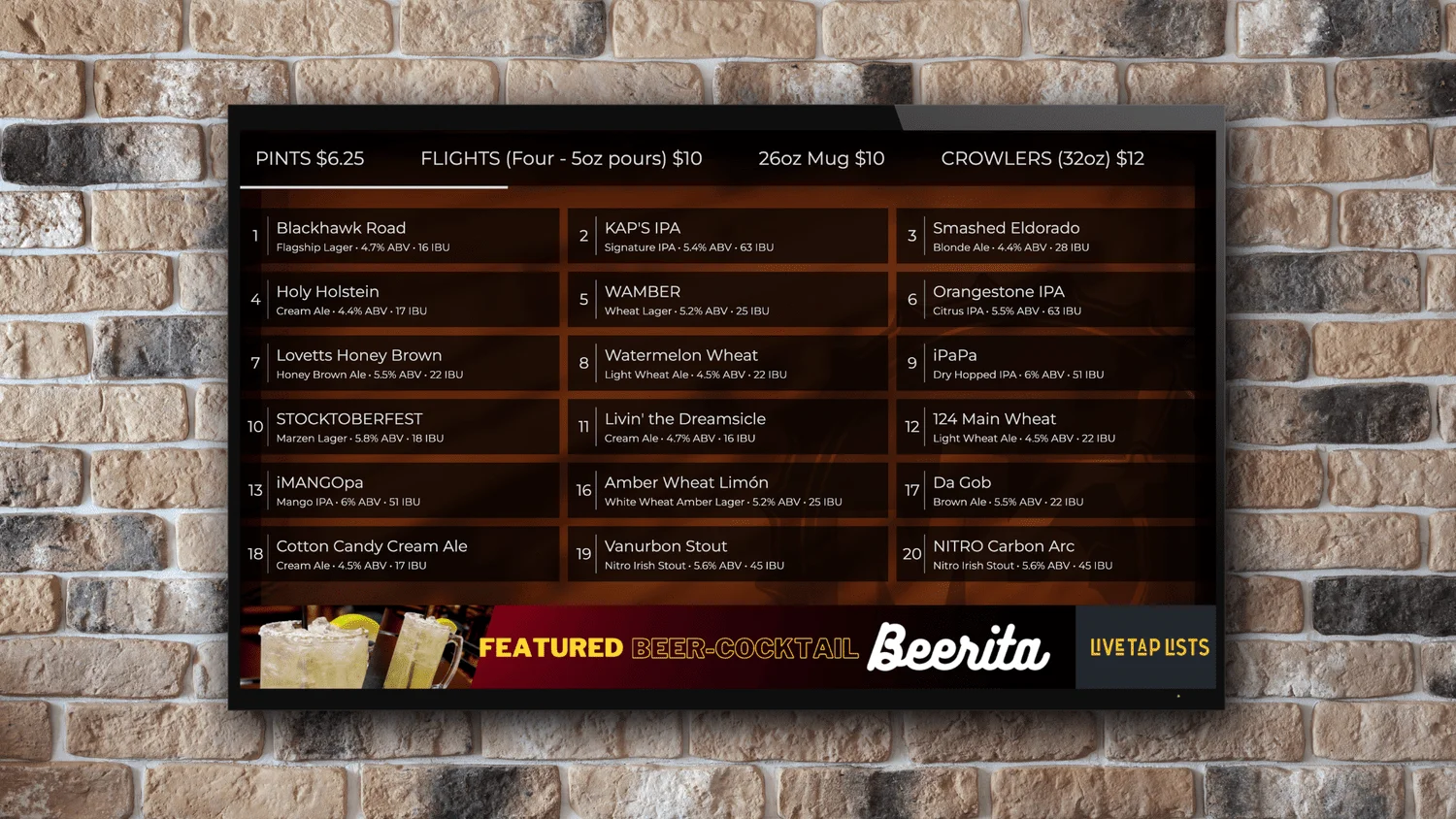
Live Tap Lists is a specialized menu management solution built for taprooms, breweries, and bars that struggle to keep their menus up to date. By integrating directly with your existing Point of Sale (POS) system, it ensures that every menu format — whether digital, printed, QR code, or web — is always in sync with your current inventory. When a keg kicks or a new beer goes on tap, changes made in your POS are instantly reflected across all your menus without any manual intervention. The platform offers four distinct menu formats: digital menu boards that display live tap lists on TVs or screens using your branding; printable tap lists formatted for standard 8.5" x 11" paper; QR code menus that let customers view the current menu on their smartphones; and embeddable website widgets that show your live tap list on your own site with a confidence-building "last updated" timestamp. Customization is a core feature — you can apply your logo, brand colors, and fonts across all formats, and each board or menu can display beer names, images, descriptions, serving sizes, prices, ABV, and IBU. The configuration interface lets you preview changes in real time before pushing them live. Live Tap Lists is ideal for busy taproom operators who want a polished, always-accurate guest experience without the constant overhead of manual menu management.
Key Features
- POS System Sync: Automatically pulls drink data from your Point of Sale system so all menus stay current the moment inventory changes.
- Digital Menu Boards: Display a live, branded tap list on in-house TVs or digital screens showing names, images, descriptions, sizes, prices, ABV, and IBU.
- Printable Tap Lists: Generate print-ready menus on standard 8.5" x 11" paper with customizable colors, fonts, and logo in just a few clicks.
- QR Code Menus: Let guests scan a QR code to instantly view your current tap list on their own device — no app download required.
- Website Embed: Embed a live tap list widget directly on your website that adapts to your site's style and displays a 'last updated' timestamp.
Use Cases
- A craft brewery displaying a live rotating tap list on wall-mounted TVs in their taproom, automatically updated as kegs are tapped or kicked.
- A busy bar generating a fresh printed menu each week with the latest drinks without manually reformatting a document.
- A taproom offering QR code table cards so guests can browse the current beer selection on their phones during peak hours.
- A brewery embedding a live tap list on their website so out-of-town visitors can check what's on before making the trip.
- A multi-location bar group maintaining consistent, branded menus across all venues through a single POS-integrated platform.
Pros
- Always Accurate Menus: Direct POS integration means menus update instantly when inventory changes, eliminating outdated printed or digital listings.
- Multiple Menu Formats: One platform covers digital boards, print, QR, and web embeds — reducing the need for separate tools or manual re-entry.
- Brand-Friendly Customization: Apply your logo, fonts, and colors across all menu types with a real-time preview before publishing.
Cons
- Niche Use Case: Primarily designed for taprooms and bars — less applicable to general restaurants or other food service businesses.
- POS Dependency: Full automation relies on POS integration; businesses without a compatible POS may need manual data entry.
- Subscription Required: Ongoing access requires a paid subscription after the free trial period ends.
Frequently Asked Questions
How does Live Tap Lists stay in sync with my menu?
Live Tap Lists integrates directly with your Point of Sale (POS) system. When you update a beer or remove a keg in your POS, those changes are automatically reflected across all your Live Tap Lists menus — digital boards, QR codes, printable lists, and website embeds — instantly.
What information can I display on my menus?
You can display drink names, images, descriptions, serving sizes, prices, ABV (alcohol by volume), and IBU (international bitterness units). Food categories can also be added alongside drink items.
Do customers need to download an app to use the QR code menu?
No. The QR code menu opens directly in any smartphone browser — no app download is required for customers.
Can I customize the look of my menus?
Yes. You can upload your logo, choose brand colors and fonts, and use your own branding as a background for digital boards. Changes can be previewed in real time before going live.
Is there a free trial available?
Yes, Live Tap Lists offers a free trial so you can explore the platform before committing to a subscription. Paid subscription plans are required for continued access after the trial.