

About
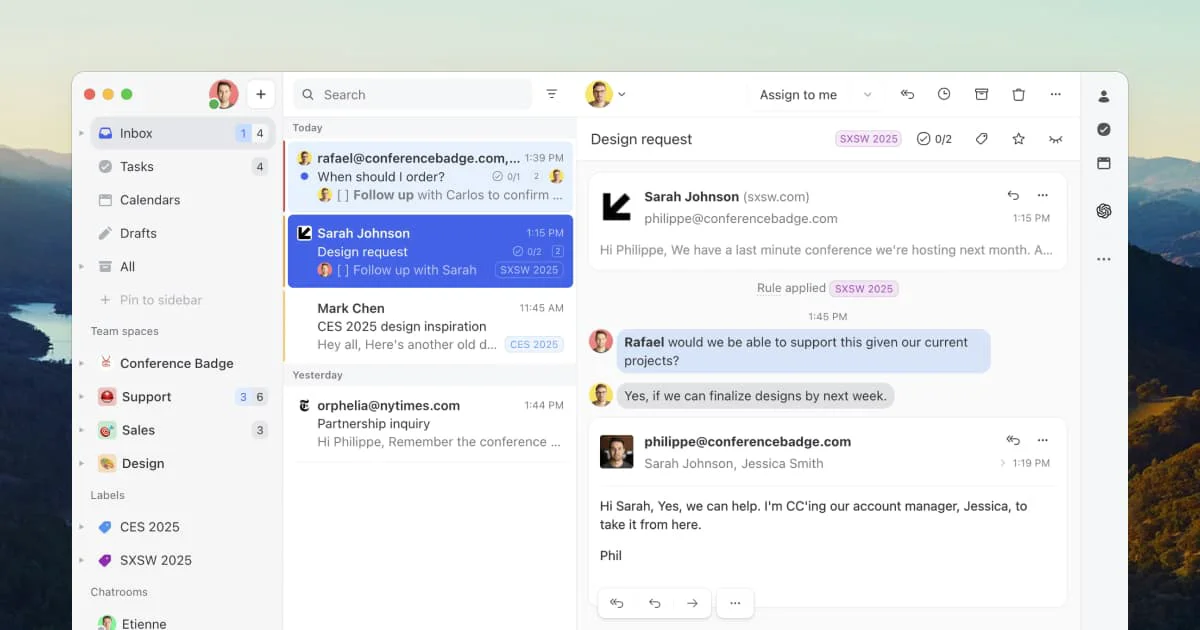
Missive is a team-first email collaboration platform designed for businesses that run on email. Unlike traditional email clients built for individuals, Missive gives entire teams visibility and coordination tools built directly into the inbox experience. Teams can share inboxes, collaboratively draft replies, discuss emails via internal threads before hitting send, and assign emails as tasks to specific team members — all without leaving their workflow. The platform includes dedicated team spaces so each department has a shared inbox, shared tasks, and a focused discussion area for relevant work. Internal statuses allow stakeholders to stay informed without getting in the way of those handling the communication. Managers can monitor team capacity and redistribute workloads in real time. Missive also features a powerful automation engine that lets teams create rules for repetitive tasks, ensuring consistent handling of common email scenarios without manual intervention. An AI assistant is built in to help speed up responses and surface insights. With 25+ integrations covering tools like Google Workspace, Office 365, iCloud, and SMS, Missive fits into existing business workflows rather than replacing them. Missive is trusted by 5,000+ companies across industries including accounting, law, real estate, logistics, and e-commerce. It is ideal for professional services firms, sales teams, and customer support operations that need structured, transparent email collaboration at scale.
Key Features
- Shared Team Inboxes: Give each team a dedicated shared inbox with visibility into who is handling what, preventing duplicate replies and dropped conversations.
- Internal Threads & Collaborative Drafting: Discuss emails privately with teammates inside the conversation and co-author replies before they are sent to the recipient.
- Email-to-Task Conversion: Turn any email into an assignable task with due dates and priority, enabling teams to manage workload directly from the inbox.
- AI Assistant & Automations: Use built-in AI to draft responses faster and create automation rules that handle repetitive email tasks automatically every time.
- 25+ App Integrations: Connect Missive with Google Workspace, Office 365, iCloud, SMS, and 25+ other tools to enrich email context without switching apps.
Use Cases
- Customer support teams managing a shared support inbox with clear ownership and response tracking.
- Law and accounting firms that need internal discussion and approval workflows before sending client emails.
- Sales teams converting inbound email leads into tasks and tracking follow-up pipelines from within their inbox.
- Logistics and operations teams using automations to route, label, and respond to routine email requests without manual effort.
- Remote-first companies replacing siloed individual inboxes with transparent team inboxes to improve coordination and accountability.
Pros
- Built for Team Transparency: Internal statuses and real-time team capacity views give managers and teammates full visibility without micromanaging individual inboxes.
- All-in-One Email Workspace: Combines email, chat, tasks, and automations in one platform, reducing the need for separate project management or messaging tools.
- Flexible and Customizable: Shortcuts, layouts, templated replies, and automation rules can all be tailored to fit unique team workflows.
- Wide Platform Support: Available across web, desktop, iOS, and Android so teams can collaborate from any device seamlessly.
Cons
- Learning Curve for New Teams: Teams migrating from traditional email clients may need time to adopt new concepts like shared inboxes, internal threads, and task assignment.
- Pricing Scales With Team Size: Costs can increase significantly for larger organizations, making it a bigger investment than standard email tools.
- Email-Centric Focus: Missive is optimized for email-heavy workflows; teams with minimal email communication may not leverage its full value.
Frequently Asked Questions
What makes Missive different from regular email clients like Gmail or Outlook?
Missive is built specifically for team collaboration. Unlike standard email clients designed for individual use, Missive offers shared inboxes, internal discussion threads, real-time assignment, task management, and automation — all inside the email experience.
Can multiple people reply to the same email in Missive?
Yes. Missive supports collaborative drafting, so multiple team members can work on a reply together before it is sent. Internal threads allow discussion without the recipient seeing the conversation.
Does Missive work with Gmail and Outlook?
Yes. Missive integrates with Google Workspace (Gmail), Office 365 (Outlook), iCloud, IMAP-based accounts, and more, so teams can bring all their email into one unified inbox.
Is there a free plan available?
Missive offers a free trial so teams can explore its features before committing. Paid plans are available for teams that need advanced collaboration, automation, and integration capabilities.
What industries use Missive most?
Missive is popular across accounting, law, real estate, logistics, e-commerce, professional services, sales, and customer support — any industry where email is a primary business communication channel.