
About
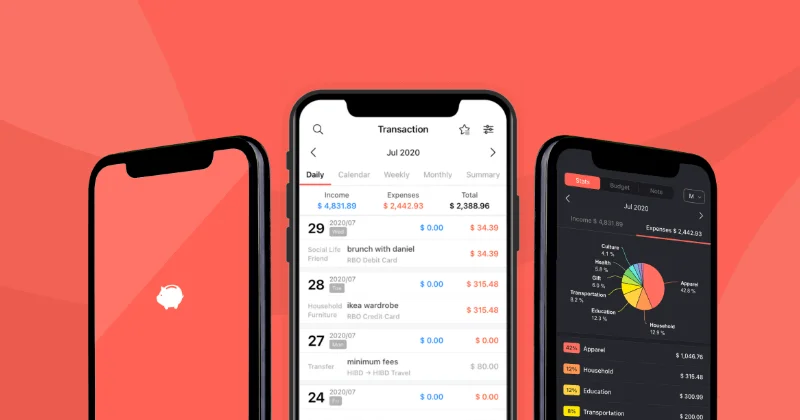
Money Manager is a comprehensive personal finance management app developed by Realbyte Inc., trusted by over 20 million users worldwide. Designed for simplicity and depth, it provides everything individuals need to take control of their financial lives — from daily expense logging to long-term asset management. The app features intuitive double-entry bookkeeping, enabling users to track savings, insurance, loans, and real estate alongside everyday spending. Its advanced budget feature lets users set monthly spending limits per category, with clear visual feedback through organized charts and an improved calendar view for reviewing all monthly transactions at a glance. Users can attach receipts and photos directly to transactions for better record-keeping, and use reinforced filtering options to get granular insights into their spending. Asset graphs display financial trends over time to support smarter long-term decisions. With support for both light and dark modes, Money Manager delivers a polished and accessible mobile experience on iOS and Android. It caters to individuals, students, and anyone looking to build healthier financial habits — whether managing a household budget, tracking travel costs, or monitoring long-term savings. Its combination of ease of use, depth of features, and a 4.7-star rating from over 270,000 reviews makes it one of the most trusted personal finance apps globally.
Key Features
- Double-Entry Bookkeeping: Manage savings, insurance, loans, and real estate alongside everyday spending using a structured double-entry accounting system.
- Advanced Budget Management: Set monthly spending budgets for each category and track progress in real time to stay on top of your financial goals.
- Asset & Expense Charts: Visualize financial health with aesthetically organized expense charts and asset trend graphs for smarter long-term decision-making.
- Receipt & Photo Storage: Attach photos of receipts or memories directly to transactions for more accurate and organized expense records.
- Calendar & Filter Views: Review all monthly transactions in a unified calendar interface, with powerful filtering options for detailed spending analysis.
Use Cases
- Tracking daily personal expenses to stay within a self-set monthly budget
- Managing household finances including savings, loans, insurance, and real estate
- Monitoring spending patterns and asset trends using visual charts and graphs
- Storing and organizing receipts digitally for tax preparation or reimbursements
- Building healthy financial habits as a student or first-time budgeter
Pros
- Massively Popular & Proven: With 20M+ downloads and a 4.7-star rating from over 270,000 reviews, Money Manager is one of the most trusted personal finance apps available.
- Comprehensive Financial Tracking: Goes well beyond simple expense logging with double-entry bookkeeping, asset tracking, and per-category monthly budgets.
- Intuitive & Polished UI: Clean interface with light/dark mode, calendar views, and well-organized charts make managing finances accessible and enjoyable.
- Google Play Editors' Choice: Officially recognized by Google for outstanding quality and usefulness among personal finance apps.
Cons
- Mobile-First Experience: The primary experience is optimized for mobile; a full-featured web or desktop app is not prominently available.
- No AI-Driven Insights: Unlike newer fintech tools, Money Manager lacks AI-powered features such as automated transaction categorization or predictive budgeting.
- Advanced Features May Require Payment: As a freemium app, some deeper functionality may be locked behind in-app purchases or a premium subscription.
Frequently Asked Questions
What platforms is Money Manager available on?
Money Manager is primarily available as a mobile app on iOS and Android, with information and support accessible via the Realbyte website.
Is Money Manager free to use?
Money Manager operates on a freemium model — the core app is free to download and use, with potential premium features available via in-app purchase.
What is double-entry bookkeeping in Money Manager?
Double-entry bookkeeping in Money Manager lets you record both sides of a financial transaction, making it easier to manage savings, loans, insurance, and real estate assets accurately.
Can I store receipts in the app?
Yes, Money Manager allows you to attach photos of receipts or other images to individual transactions, helping keep your expense records organized and complete.
How does the budget feature work?
You can set a monthly spending budget for each category, and Money Manager will track your actual spending against those limits with visual charts and alerts to help you stay on track.