

About
MoodBoard AI is a comprehensive AI-powered creative suite designed to transform ideas into polished, professional mood boards effortlessly. Users start by defining a creative vision—whether for a room, a brand, a fashion concept, or an event—then select a style aesthetic (modern, vintage, minimalist, etc.) and color palettes. The AI generates stunning mood boards tailored to those preferences in seconds. Beyond generation, the platform offers a full Mood Board Editor where users can import AI-generated boards for further customization, remove backgrounds, crop and flip items, and build shareable shopping lists complete with product prices. Integrated product discovery surfaces real-life items inspired by the generated board, bridging the gap between inspiration and action. As part of its 3-in-1 Creative Suite, MoodBoard AI also includes MyRoomDesigner.AI—a companion tool that detects room layouts and allows interactive chat to add or swap furniture and materials, plus a high-resolution 3D room rendering feature. With over 120,000 mood boards generated and a 4.9/5 creator rating, the platform is trusted by interior designers, fashion stylists, brand managers, and creative professionals who need to move quickly from concept to polished presentation.
Key Features
- One-Click AI Mood Board Generation: Generate beautiful, professional mood boards instantly by selecting a style, color palette, and layout — the AI does the heavy lifting in seconds.
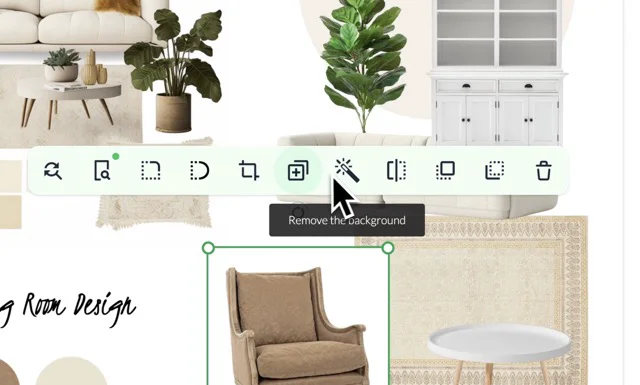
- Built-In Mood Board Editor: Import AI-generated boards into the full editor to further customize, remove backgrounds, crop or flip items, and refine your design with granular control.
- Real-Life Product Discovery & Shopping Lists: Discover curated real-life products inspired by your mood board and compile shareable shopping lists complete with prices directly within the platform.
- 3D Room Design Integration (MyRoomDesigner.AI): Upload your mood board to MyRoomDesigner.AI to transform it into an interactive 3D room design, with AI-powered furniture detection and chat-based customization.
- Multi-Use-Case Style Selection: Choose from a wide range of aesthetics — modern, vintage, minimalist, and more — for interior design, fashion, restaurant branding, event planning, and beyond.
Use Cases
- An interior designer quickly generates a mood board for a client's living room renovation, selecting a minimalist aesthetic and importing it into the editor to attach real furniture product links with prices.
- A fashion stylist creates a seasonal lookbook mood board by choosing color palettes and vintage style cues, then refines the output with the board editor before sharing with the creative team.
- A restaurant owner uses MoodBoard AI to visualize a new dining space concept, combining AI-generated ambiance boards with the 3D room designer to present to contractors.
- A brand manager developing event branding generates multiple mood board variations across different style themes in minutes, streamlining client review and approval cycles.
- A freelance decorator builds a shareable shopping list from a mood board for a client, providing product recommendations with pricing pulled directly from the platform's product discovery feature.
Pros
- Fast from Concept to Polished Design: The AI-driven generation pipeline dramatically reduces the time needed to turn a loose idea into a presentation-ready mood board.
- All-in-One Creative Suite: Combines AI generation, a manual editor, product shopping integration, and 3D room visualization in a single platform — removing the need for multiple tools.
- No Design Skills Required: The intuitive no-code interface and AI assistance make it accessible to non-designers, freelancers, and professionals alike.
Cons
- Primarily Web-Based: MoodBoard AI is only available as a web application, with no dedicated mobile apps for iOS or Android, limiting on-the-go use.
- Advanced Features Behind Subscription: Full access to the editor, upscaling, product discovery, and 3D design tools requires a paid plan; free usage appears limited.
- AI Output May Need Refinement: Like most generative AI tools, initial outputs may not perfectly match the user's vision and may require additional editing passes in the board editor.
Frequently Asked Questions
What types of projects can I create mood boards for?
MoodBoard AI supports a wide range of use cases including interior design, fashion styling, restaurant and hospitality branding, event planning, and general creative or brand projects.
Can I customize the AI-generated mood boards?
Yes. After generation, you can import your mood board into the built-in Mood Board Editor to adjust layouts, remove or replace items, crop images, remove backgrounds, and add real-life products.
How does the shopping list feature work?
Within the Mood Board Editor, you can add real-life products sourced from the platform's product discovery engine. These are compiled into a shareable shopping list with prices that you can send to clients or collaborators.
What is MyRoomDesigner.AI and how does it integrate?
MyRoomDesigner.AI is a companion 3D interior design tool included in the Creative Suite. You can upload a mood board as inspiration, and it will generate a 3D room layout that you can further customize via interactive chat.
Is MoodBoard AI free to use?
MoodBoard AI offers a free moodboard gallery and initial access, but full features — including the editor, upscaling, product discovery, and 3D design — are available on paid subscription plans that can be cancelled anytime.