
About
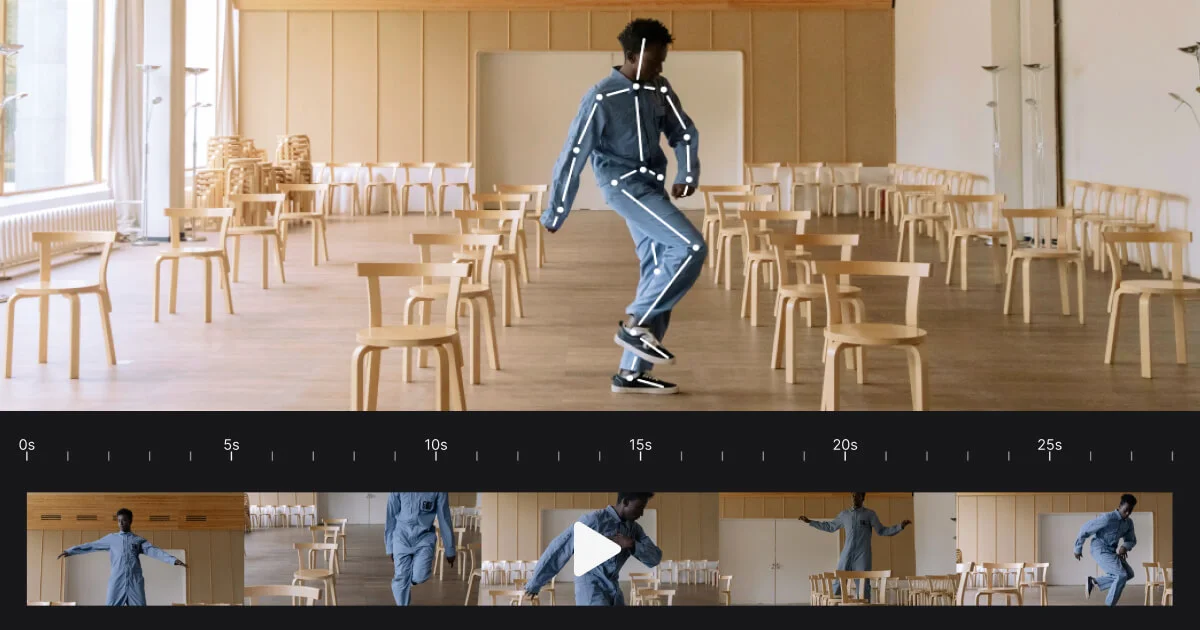
Rokoko Vision is a free, AI-powered motion capture tool built for animators, game developers, filmmakers, and 3D creators who want to bring characters to life without expensive equipment. Using just a computer webcam or a pre-recorded video file, users can capture full-body motion data in 3D directly from a browser — no mocap suit, tracking markers, or specialized hardware required. The tool follows a simple three-step workflow: record movement via webcam (or upload a video), view and clean up the resulting mocap data in Rokoko Studio (also free), and retarget the animation onto a custom character. Rokoko Vision supports both single-camera and dual-camera setups, with dual-cam mode offering improved tracking accuracy for more complex movements. Free usage is unlimited for recordings up to 15 seconds, making it ideal for quick motion tests, pre-visualization, and short animation clips. For longer takes or more demanding production needs, paid plans are available. The captured animations can be exported and used in popular 3D software and game engines. Rokoko Vision is particularly well-suited for indie game developers, solo animators, VFX artists, film production teams doing pre-viz, and educators teaching animation. Its accessibility has made it a community favorite, lowering the barrier to entry for motion capture and democratizing a tool previously reserved for large studios with dedicated equipment.
Key Features
- Webcam & Video-Based Mocap: Capture full-body motion data directly from a browser using a standard webcam or by uploading pre-recorded footage — no suits or hardware needed.
- Single & Dual-Camera Support: Use a single camera for basic capture or upgrade to a dual-camera setup for significantly improved tracking accuracy and motion fidelity.
- Rokoko Studio Integration: View, clean up, and refine captured motion data in Rokoko Studio (free), using tools like foot locking filters and character retargeting.
- Free Unlimited Short Recordings: Enjoy limitless free usage for recordings up to 15 seconds, making it accessible for iteration, prototyping, and learning without cost barriers.
- Browser-Based, No Installation Required: Runs entirely in the browser — no downloads or plugins needed to start capturing motion data immediately.
Use Cases
- Indie game developers creating character animations without access to a professional mocap studio
- 3D animators using webcam captures for quick pre-visualization and motion prototyping
- VFX artists generating reference motion data to assist in manual animation or simulation
- Film production teams capturing rough performances for previsualization before principal photography
- Animation students and educators learning and teaching motion capture techniques with zero hardware investment
Pros
- Truly Accessible Motion Capture: Eliminates the need for expensive mocap suits or studio equipment, making 3D animation accessible to indie creators and beginners.
- Fast and Easy Workflow: A simple three-step process (record, review, retarget) means users can go from raw movement to animated character in minutes.
- Free Tier with Real Value: The free plan supports unlimited recordings up to 15 seconds, which is sufficient for many use cases including pre-viz and quick animation tests.
Cons
- 15-Second Free Recording Limit: Free recordings are capped at 15 seconds, which may be insufficient for longer animation sequences without upgrading.
- Accuracy Limited Without Dual-Camera: Single-camera capture may produce less precise motion data compared to dual-camera or hardware-based mocap solutions, requiring more manual cleanup.
- Body Visibility Requirement: Capture quality depends heavily on clear, unobstructed visibility of the subject's full body in the video frame.
Frequently Asked Questions
Is Rokoko Vision completely free to use?
Yes, Rokoko Vision offers unlimited free usage for recordings up to 15 seconds. Longer recordings and advanced features like dual-camera support may require a paid upgrade.
Do I need special equipment to use Rokoko Vision?
No. Rokoko Vision works with any standard webcam or pre-recorded video file. No mocap suits, tracking markers, or specialized hardware are required.
What software can I use the exported motion data with?
Captured motion data integrates with Rokoko Studio (free), where it can be cleaned up and retargeted to custom characters before exporting to popular 3D and game development tools.
What is the difference between single-cam and dual-cam modes?
Single-camera mode uses one webcam feed for motion capture, while dual-camera mode uses two camera angles simultaneously to improve tracking accuracy and reduce errors in complex movements.
Who is Rokoko Vision designed for?
Rokoko Vision is designed for animators, indie game developers, VFX artists, filmmakers doing pre-visualization, and students or educators in 3D animation — anyone who needs accessible motion capture without a large budget.