

About
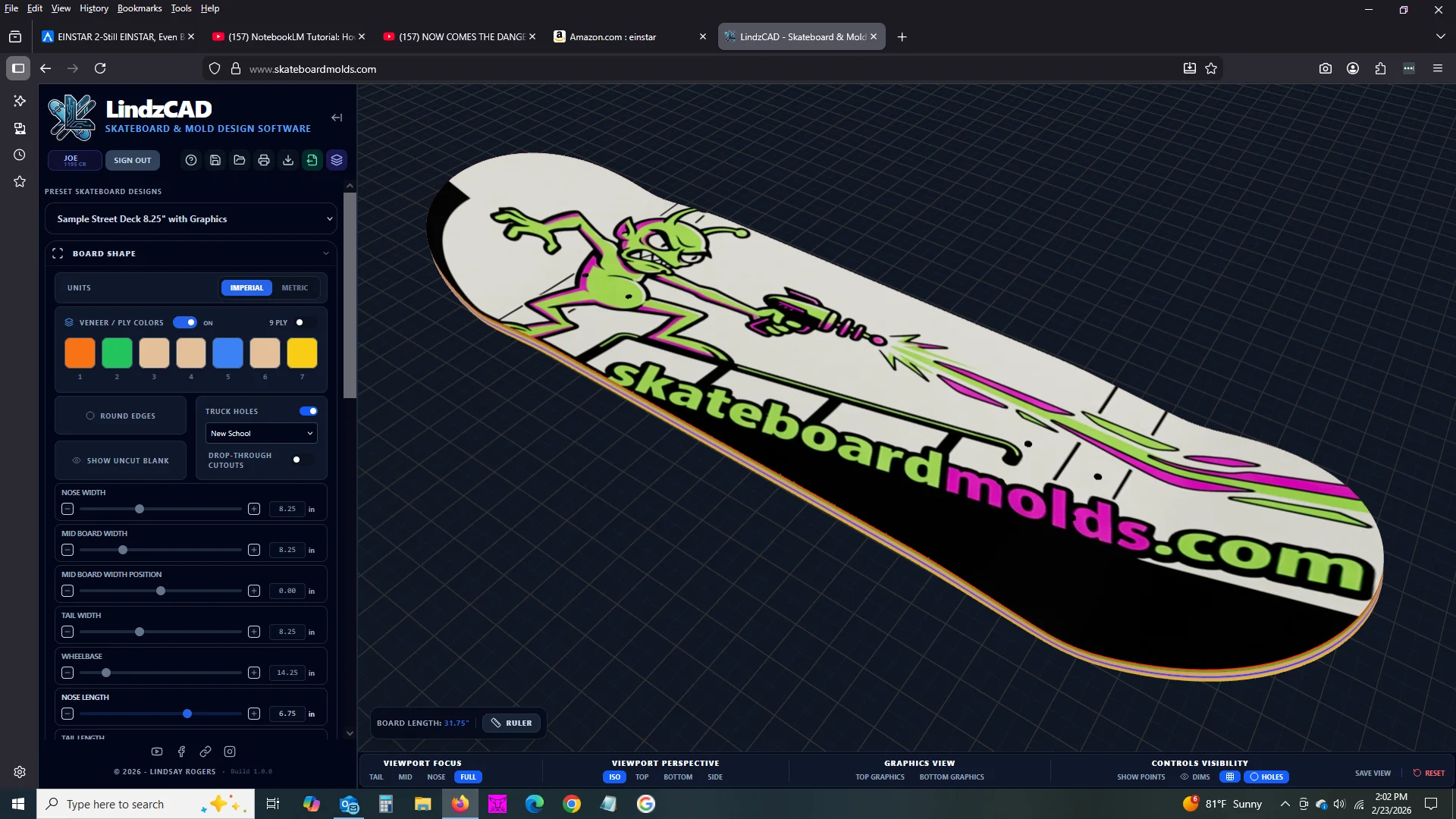
LindzCAD Skate is a fully-featured CAD and graphic design application from SkateboardMolds.com that makes custom skateboard creation accessible to builders of every skill level. The software provides dozens of editable parameters and drag-and-drop control points for designing board shapes—nose and tail widths, wheelbase, concave depth, kick angles, camber, rocker arcs, and drop-deck geometry—all reflected instantly in a high-resolution 3D viewport. Built-in presets for street, cruiser, longboard, old school, pintail, downhill, and more let users jump straight into customization or start from scratch. The Advanced Shape module supports asymmetric profiles, round edges, and drop-through cutouts. A dedicated Mold Design view lets builders preview how their deck geometry translates into the CNC-machined mold surfaces before ordering. On the creative side, an integrated AI image generator lets users describe deck graphics in plain text or via voice prompt and renders them directly onto the 3D board model with accurate perspective and curvature. A Silkscreen Graphics module supports PMS spot colors, AI-restricted color palettes, color separations, spreads, and export of print-ready files with registration marks. Scene & Lighting controls enable professional product-shot previews. Finished designs can be exported as CNC-ready CAD files that map exactly to spec, and users can order precision CNC-machined molds and hydraulic presses directly through the site. On-screen annotations, dimension callouts, rulers, and printable PDF spec sheets round out the toolset. A native mobile app for Android and iOS is in development.
Key Features
- Real-Time 3D Board Shaping: Adjust dozens of parameters—nose/tail width, wheelbase, concave depth, kick angles, camber, rocker, and drop-deck geometry—with sliders and drag handles, all reflected instantly in a high-resolution 3D viewport.
- AI-Powered Deck Graphics: Type or speak a description of your desired graphic and the integrated AI image generator renders it directly onto your 3D board model with accurate perspective and curvature mapping.
- Silkscreen & Production Export: Generate production-ready silkscreen templates with PMS spot colors, AI-restricted palettes, color separations, spreads, and registration marks sized to exact deck dimensions.
- CNC-Ready CAD File Export: Export mold-specification CAD files that exactly match your designed dimensions, ready to feed directly into CNC machining workflows or order as a finished mold from the site.
- Mold Preview & Studio Lighting: Toggle between your finished deck and the mold that will shape it, then present your design in a virtual studio with adjustable lighting and environment maps for professional product shots.
Use Cases
- A DIY skateboard builder designs a custom street deck shape, generates branded AI graphics, and exports a CNC mold file to order a precision mold directly from the platform.
- A small-batch skateboard brand uses the silkscreen module to create PMS spot-color templates and print-ready files for a limited production run.
- A skateboard shop offers customers a personalized deck design service by using LindzCAD Skate's 3D viewport and AI prompt tool to visualize custom graphics in minutes.
- An industrial design student uses the advanced concave and kick-angle controls to prototype and document unique deck geometries for a product design course.
- A longboard enthusiast experiments with drop-through cutouts, asymmetric outlines, and rocker profiles to dial in a custom freeride setup before committing to a mold order.
Pros
- End-to-End Workflow: Covers the entire pipeline from shape design and graphic creation to CNC file export and physical mold ordering, eliminating the need for multiple separate tools.
- No CAD Experience Required: Preset templates, slider-based controls, and an AI graphic prompt window make the tool accessible to hobbyists and first-time builders without engineering or design backgrounds.
- AI Graphics in Seconds: Text-to-image generation renders custom deck art directly on the 3D model, dramatically speeding up the visual design phase for custom and small-batch production runs.
- Integrated Physical Product Store: CNC-machined molds and hydraulic presses are sold directly on the platform, creating a seamless path from digital design to real-world deck pressing.
Cons
- Highly Niche Audience: The tool is purpose-built for skateboard (and ski/snowboard) builders, limiting its appeal outside that specific DIY hardware community.
- Mobile App Not Yet Available: A native Android and iOS app is listed as 'coming soon,' meaning the full design experience is currently limited to desktop web browsers.
- Pricing Transparency: Subscription or one-time pricing details are not prominently displayed on the landing page, requiring users to sign up to understand costs.
Frequently Asked Questions
What is LindzCAD Skate?
LindzCAD Skate is the AI-powered 3D CAD and graphic design application offered by SkateboardMolds.com. It lets you design custom skateboard shapes, generate AI deck graphics, and export CNC-ready mold files—all in a browser.
Do I need CAD or design experience to use it?
No. The software is built around slider controls, preset templates, and an AI prompt window so that beginners can design professional-quality boards without any prior CAD or graphic design knowledge.
Can I order a physical mold directly from my design?
Yes. Once you've finalized your design in LindzCAD Skate, you can export CNC-ready files or place an order for a precision CNC-machined mold directly through SkateboardMolds.com.
What types of boards can I design?
The software supports street decks, cruisers, longboards, old school shapes, pintails, downhill boards, and more via built-in presets. You can also design fully custom shapes from scratch.
Is a mobile version available?
A native mobile app for Android and iOS is currently in development and listed as 'coming soon.' At present, LindzCAD Skate is accessible via desktop web browsers.