
About
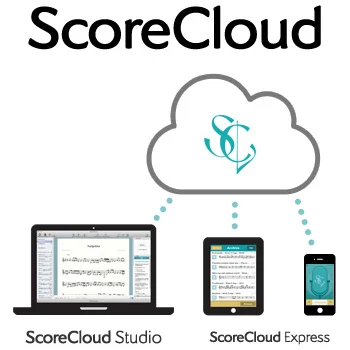
ScoreCloud is a suite of AI-driven music notation tools designed to make transcribing and composing music effortless for musicians of all levels. Often described as 'Google Translate for music,' ScoreCloud automatically converts audio — whether a live recording, MP3, or YouTube link — into professional sheet music notation. ScoreCloud Studio is the flagship desktop application for Windows and Mac, offering multi-staff arrangements, MIDI and audio transcription, deep editing controls, articulations, dynamics, lyrics, chord symbols, and export to PDF, MusicXML, and MIDI formats. It's ideal for composers, arrangers, teachers, choirs, and bands. ScoreCloud Songwriter focuses on singer-songwriters and acoustic performers, automatically separating melody from accompaniment to generate lead sheets with melody, lyrics, and chords from a single take — even from a YouTube URL. It also supports transposition, tempo changes, and karaoke track exports. ScoreCloud Express brings audio-to-notation capability to iPhone and iPad, letting musicians hum or sing a melody anywhere and sync results to their ScoreCloud account for further editing in Studio. With a free tier supporting up to 10 saved songs, and paid plans ranging from $5.99 to $20.99/month, ScoreCloud suits hobbyists, students, music teachers, and professional composers alike. All products sync across devices via a shared ScoreCloud account.
Key Features
- Audio-to-Sheet-Music Transcription: Record or import audio (live take, MP3, or YouTube link) and ScoreCloud's AI automatically generates accurate sheet music notation.
- Automatic Lead Sheet Generation: ScoreCloud Songwriter separates melody, lyrics, and chords from a single vocal+instrument recording to produce instant lead sheets.
- Full-Score Composition & Editing: ScoreCloud Studio supports multi-staff layouts, articulations, dynamics, repeats, rehearsal marks, lyrics, and chord symbols with deep editing control.
- MIDI & Multiple Export Formats: Export your scores as print-ready PDFs, MusicXML, or MIDI files, or share a quick link to an interactive web player.
- Cross-Device Sync: All projects sync across Windows, Mac, iPhone, and iPad via your ScoreCloud account for seamless workflow across devices.
Use Cases
- A singer-songwriter records a new song idea on their phone and imports the MP3 into ScoreCloud Songwriter to instantly get a lead sheet with melody, chords, and lyrics for rehearsal.
- A music teacher uses ScoreCloud Studio to transcribe student performances into sheet music for review and grading, exporting print-ready PDFs for the class.
- A composer arranges a piece for a choir by layering overdubbed audio recordings and MIDI tracks in ScoreCloud Studio, then exports the multi-staff score as MusicXML.
- A guitarist imports a YouTube recording of a song into ScoreCloud Songwriter to automatically extract the chord progression for practice.
- A vocalist prepares for an audition by recording their voice and piano accompaniment in one take and generating a clean piano sheet to share with the accompanist.
Pros
- Fast Audio-to-Notation Pipeline: Musicians can go from humming or recording to readable sheet music in seconds, eliminating manual transcription time.
- Multi-Platform Availability: Available on Windows, Mac, iPhone, and iPad with cloud sync, making it flexible for studio and on-the-go use.
- Generous Free Tier: The free plan allows up to 10 saved songs with core features, giving new users a solid trial experience without commitment.
- Versatile Input Methods: Supports live audio recording, MP3 uploads, YouTube imports, MIDI keyboard, and manual note entry for maximum flexibility.
Cons
- Song Limit on Free Plan: The free tier caps users at 10 saved songs, which may be restrictive for active musicians who create frequently.
- Transcription Accuracy Varies: Complex polyphonic recordings or noisy audio can produce less accurate transcriptions, requiring manual correction.
- Advanced Features Behind Paywall: Key capabilities like unlimited songs, batch MIDI analysis, and full import/export formats require paid plans up to $20.99/month.
Frequently Asked Questions
What is ScoreCloud and how does it work?
ScoreCloud is AI-powered music notation software that listens to audio — from a live recording, MP3, or YouTube video — and automatically converts it into sheet music. It uses advanced audio analysis to identify melody, rhythm, chords, and lyrics.
Is ScoreCloud free to use?
Yes, ScoreCloud offers a free plan that allows you to save up to 10 songs. Paid plans start at $5.99/month (Plus), with Songwriter at $11.99/month and Pro at $20.99/month offering additional features and unlimited songs.
What is the difference between ScoreCloud Studio and ScoreCloud Songwriter?
ScoreCloud Studio is a full-featured composition tool for creating and arranging multi-staff scores using audio, MIDI, or manual input. ScoreCloud Songwriter is designed for singer-songwriters and focuses on generating lead sheets with melody, lyrics, and chords from MP3s, YouTube links, or live vocal+instrument recordings.
What file formats can I export from ScoreCloud?
ScoreCloud supports exporting to PDF (print-ready sheet music), MusicXML (compatible with other notation software), and MIDI. You can also share a link to an interactive web player. Full export options depend on your plan.
Is ScoreCloud available on mobile devices?
Yes, ScoreCloud Express is available for iPhone and iPad. It lets you hum, whistle, or sing a melody to generate notation on the go, and syncs with your ScoreCloud account so you can continue editing in ScoreCloud Studio on desktop.