

About
SheetAI transforms Google Sheets into a powerful AI-driven workspace by giving users access to a suite of intelligent functions without leaving their spreadsheet. With over 139,000 installs and a 4.5-star rating, it's a trusted tool for professionals, analysts, and teams worldwide. The add-on integrates with leading AI providers including OpenAI, Claude, xAI, and OpenRouter, and connects to Replicate for video, OCR, image, and audio processing. It can also call external APIs to pull live data or trigger automated workflows. Key functions include SHEETAI (ask questions in plain English and get answers in cells), SHEETAI_BRAIN (train the AI on your own data via text or URLs for contextual responses), SHEETAI_LIST (generate structured lists and tables instantly), and SHEETAI_EXTRACT (smart auto-fill and data standardization using context-aware AI). SheetAI is ideal for marketers generating product descriptions at scale, data analysts classifying or enriching datasets, operations teams automating repetitive spreadsheet tasks, and content creators building AI-powered workflows—all from familiar Google Sheets formulas. Getting started is free with easy installation from the Google Workspace Marketplace.
Key Features
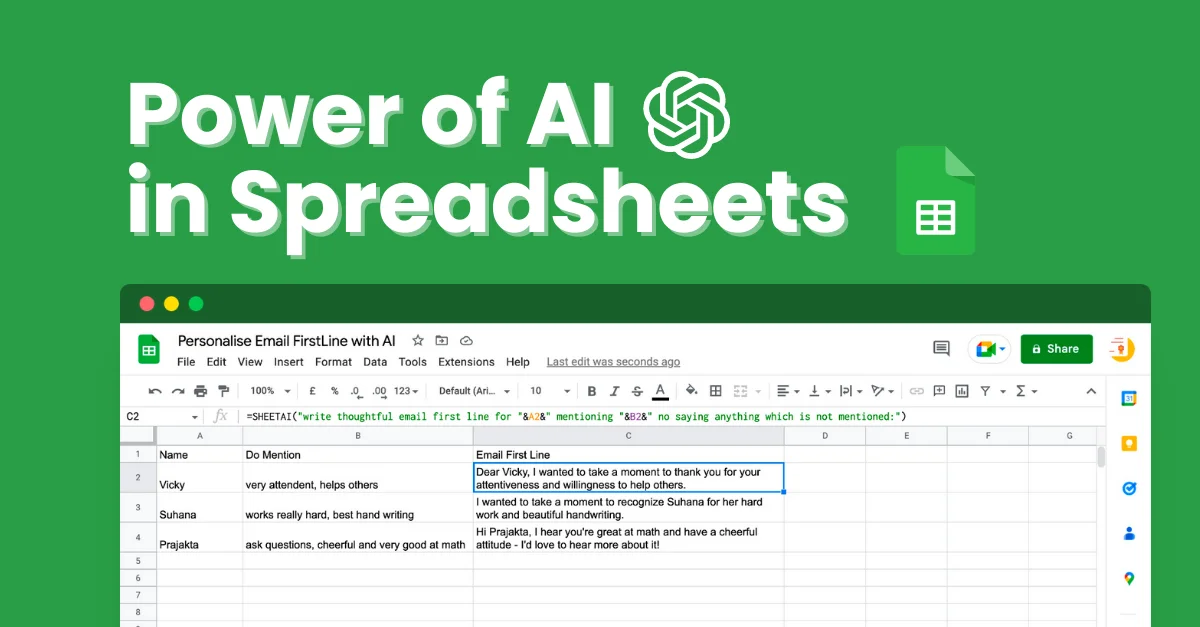
- AI Functions in Google Sheets: Use plain-English prompts inside spreadsheet cells with the =SHEETAI() function to get instant AI-generated answers, content, and analysis.
- SHEETAI_BRAIN – Context-Aware AI: Train the AI on your own data by providing text or URLs, enabling accurate and context-specific responses tailored to your business or dataset.
- Structured Content Generation: Generate organized lists and tables instantly using SHEETAI_LIST, ideal for brainstorming, categorization, and bulk content creation.
- Smart Auto-Fill & Data Extraction: Automatically complete and standardize spreadsheet data—such as product descriptions or categories—using SHEETAI_EXTRACT's context-aware intelligence.
- Multi-Provider AI & API Support: Connects to OpenAI, Claude, xAI, OpenRouter, and Replicate, plus supports custom external API calls to pull live data or automate workflows.
Use Cases
- Marketers generating product descriptions, ad copy, or SEO metadata in bulk directly within a Google Sheet.
- Data analysts classifying, tagging, or enriching large datasets with AI-powered extraction and standardization.
- Operations teams automating repetitive data entry and spreadsheet population tasks using context-aware auto-fill.
- Content creators building AI-assisted editorial calendars, topic lists, or structured content tables at scale.
- Business users querying their own company data through SHEETAI_BRAIN to get accurate, grounded AI responses without switching tools.
Pros
- Broad AI Provider Support: Works with multiple leading AI models (OpenAI, Claude, xAI, OpenRouter) giving users flexibility to choose the best model for their needs.
- No-Code AI Automation: Anyone familiar with Google Sheets formulas can harness AI capabilities without writing code, making it highly accessible.
- Unique Memory/Brain Feature: The SHEETAI_BRAIN function allows users to ground AI responses in their own data, greatly improving accuracy for business-specific use cases.
- Large Installed Base & Proven Reliability: With ~139k installs and a 4.5-star rating, it's a well-established and trusted tool used by universities and enterprise teams alike.
Cons
- Requires Google Sheets: SheetAI is exclusively a Google Sheets add-on, so users of Excel or other spreadsheet tools are not supported.
- Dependent on External AI API Costs: Usage costs are tied to underlying AI provider API keys (e.g., OpenAI), which can add up for high-volume operations.
- Learning Curve for Advanced Functions: While basic use is straightforward, mastering features like SHEETAI_BRAIN and external API integrations may require additional setup time.
Frequently Asked Questions
How do I install SheetAI?
Install SheetAI from the Google Workspace Marketplace, then open a Google Sheet and launch the add-on from Extensions > SheetAI App > Launch.
Which AI models does SheetAI support?
SheetAI supports OpenAI (including ChatGPT), Claude, xAI, and OpenRouter for language tasks, plus Replicate for video, OCR, image, and audio processing.
Is SheetAI free to use?
SheetAI is free to get started. It operates on a freemium model with paid plans available for higher usage limits and advanced features.
What is the SHEETAI_BRAIN feature?
SHEETAI_BRAIN lets you train the AI on your own data by providing text or URLs, enabling context-aware responses specific to your business or dataset instead of generic answers.
Can SheetAI connect to external data sources?
Yes. SheetAI can call any external API to pull live information or trigger automated tasks, making it useful for real-time data enrichment workflows.