

About
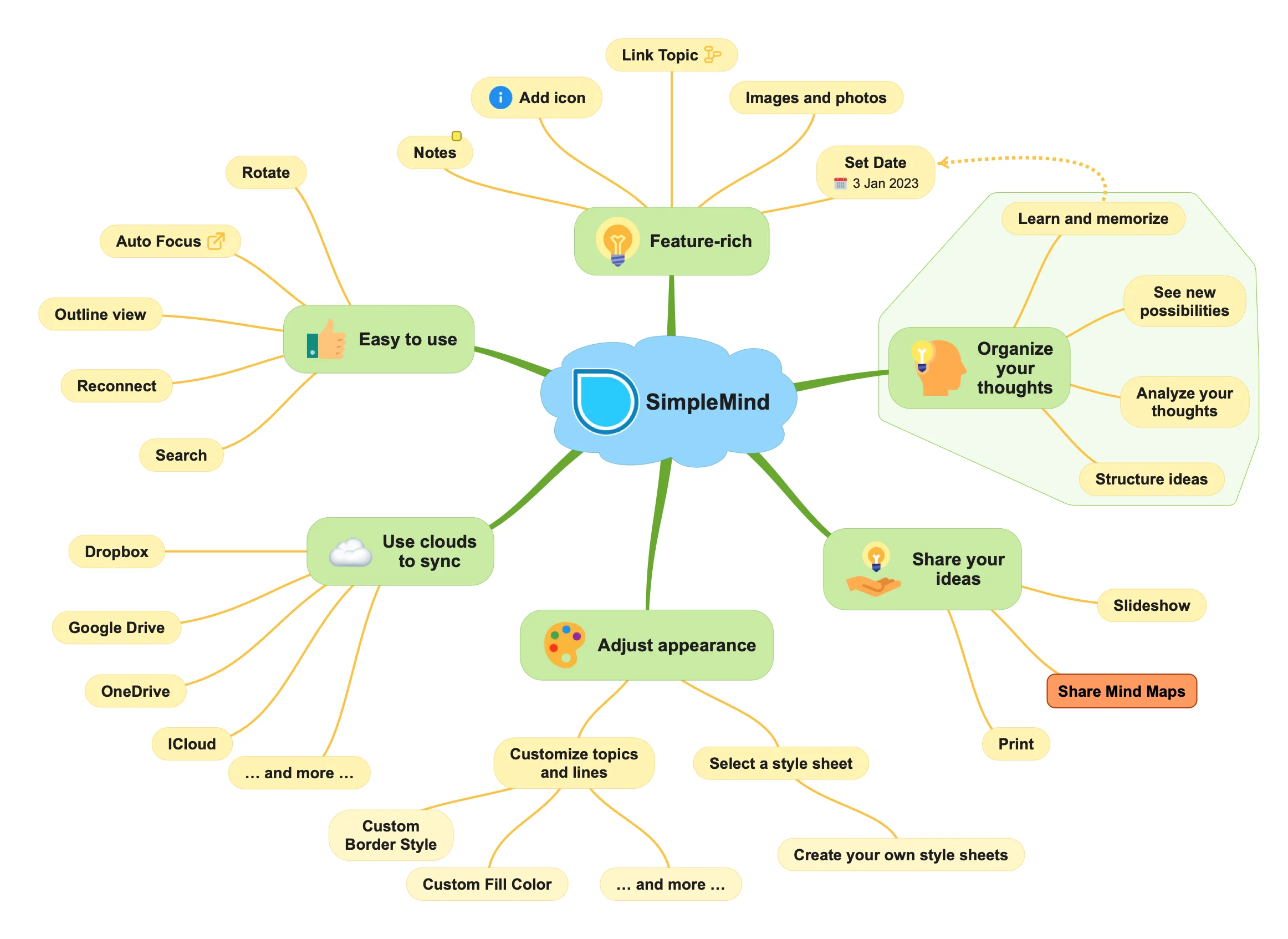
SimpleMind is a world-leading mind mapping application designed to help individuals organize their thoughts, generate new ideas, and retain information in a visually intuitive format. Available on Mac, Windows, iPhone, iPad, and Android, it offers true cross-platform flexibility with a single one-time purchase per platform — no subscriptions required. The tool supports both free-form layouts, where topics can be placed anywhere on the canvas, and a variety of structured auto-layouts ideal for brainstorming sessions. SimpleMind Pro unlocks advanced capabilities including color customization, image and photo embedding, notes, hyperlinks, checkboxes, and export to PDF for easy sharing. An autofocus feature helps users block out distractions and concentrate on specific areas of the mind map. The app is praised for its clean, intuitive interface that balances simplicity with depth, making it suitable for casual users and power users alike. SimpleMind is widely used by students breaking down complex study material, professionals preparing presentations and project plans, writers outlining their work, and educators structuring course content. The free edition offers a solid starting point, while the Pro edition delivers the full feature set needed for serious productivity. A SimpleMind Viewer is also available for sharing maps with others who don't own the app.
Key Features
- Cross-Platform Availability: Available natively on Mac, Windows, iPhone, iPad, and Android with a one-time purchase per platform and no subscription fees.
- Free-Form & Auto Layouts: Place topics freely anywhere on the canvas or choose from multiple structured auto-layouts perfect for brainstorming and structured thinking.
- Rich Topic Customization: Add colors, images, photos, notes, hyperlinks, and checkboxes to topics, enabling detailed and visually engaging mind maps.
- Autofocus Mode: Block out distractions by focusing on one branch or topic at a time, improving concentration during deep work sessions.
- Easy Sharing & Export: Share mind maps as PDFs or via the SimpleMind Viewer, making it easy to present and distribute ideas without requiring recipients to own the app.
Use Cases
- Students breaking down complex textbook chapters into visual mind maps to improve understanding and retention.
- Writers and authors outlining plots, characters, or research before starting their writing projects.
- Professionals planning projects, presentations, or strategic goals in a clear, visual format.
- Educators structuring course content and lesson plans in an organized, easy-to-follow visual layout.
- Teams and individuals brainstorming new ideas using free-form or auto-layout canvases to capture and connect thoughts quickly.
Pros
- One-Time Purchase: A perpetual license model means you pay once per platform and own the software forever — ideal in a world dominated by subscriptions.
- True Cross-Platform Support: Consistent experience across all major desktop and mobile operating systems, making it easy to work seamlessly between devices.
- Free Version Available: The free edition provides genuine functionality for users who want to get started with mind mapping before committing to a purchase.
- Intuitive & Clean Interface: Widely praised for its ease of use, SimpleMind is approachable for beginners while still offering depth for power users.
Cons
- No Real-Time Collaboration: SimpleMind lacks built-in live multi-user collaboration features, which may be a limitation for remote teams working together simultaneously.
- Pro Features Behind Paywall: Advanced capabilities like image embedding, hyperlinks, and PDF export require purchasing the Pro edition, limiting the free version's usefulness.
- Separate Purchase Per Platform: Users who want the app on multiple platforms (e.g., both Mac and Android) must pay separately for each, which can add up.
Frequently Asked Questions
Is SimpleMind free to use?
Yes, SimpleMind offers a free edition with core mind mapping features. A paid Pro edition unlocks advanced capabilities like image embedding, notes, hyperlinks, checkboxes, and PDF export.
Does SimpleMind require a subscription?
No. SimpleMind uses a one-time perpetual license model. You pay once per platform and own the software indefinitely, with no recurring subscription fees.
Which platforms does SimpleMind support?
SimpleMind is available on Mac, Windows, iPhone, iPad, and Android, making it one of the most widely supported mind mapping tools across desktop and mobile.
Can I share my mind maps with others?
Yes. You can share mind maps as PDF files or use the free SimpleMind Viewer, which allows others to view your maps without needing to own the full app.
What is the difference between the free and Pro editions?
The free edition covers basic mind mapping with topic creation and layouts. The Pro edition adds colors, images, photos, notes, hyperlinks, checkboxes, PDF export, and more advanced customization options.