

About
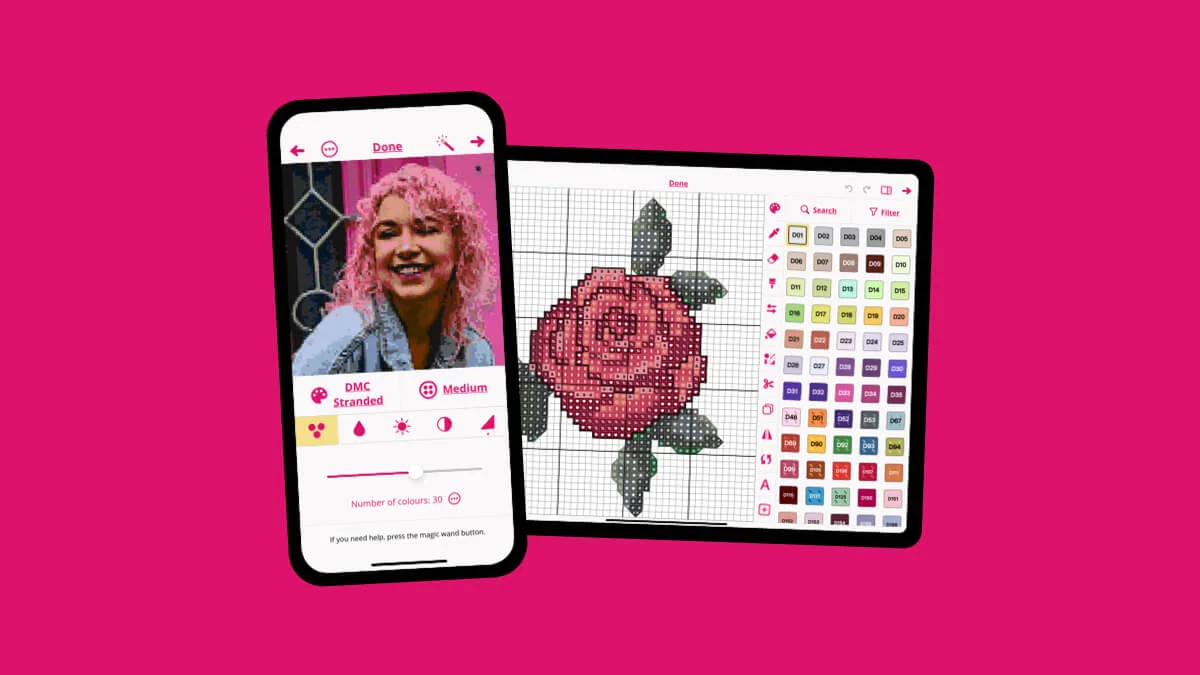
Stitchly is a powerful yet approachable cross stitch pattern design app built for Apple devices — iPhone, iPad, and Mac. Developed by the UK-based husband-and-wife team at Subtlabs Ltd, it helps crafters transform any photo or hand-drawn artwork into a detailed, stitchable cross stitch pattern in seconds. The app's photo conversion engine analyzes an image and automatically maps it to a grid-based pattern with DMC-compatible thread colors. Users can fine-tune results using a comprehensive set of editing tools — adjusting color palettes, remapping symbols, erasing or redrawing grid squares, and tracing over reference images to create wholly original designs. Stitchly also doubles as a progress tracker. Crafters can pull up their pattern on-screen, highlight individual symbols, and mark stitches as complete — eliminating the need for printed sheets. Exports include stitch counts, symbol keys, and even skein estimates to help with thread purchasing. The app is loved by hobbyists who want to recreate personal photos as gifts, as well as independent pattern designers who sell their work on platforms like Etsy. Its clean interface, fast developer support, and regular feature updates have earned it top ratings on the App Store. Stitchly is a one-time purchase — no subscription needed — making it a cost-effective alternative to desktop cross stitch software.
Key Features
- Photo-to-Pattern Conversion: Automatically converts any photo into a grid-based cross stitch pattern with mapped thread colors in seconds.
- Full Drawing & Editing Tools: Draw original designs from scratch or trace over reference images using a complete set of grid editing tools.
- Symbol & Color Management: Assign unique symbols to each thread color, adjust palettes, and remap colors for precise pattern customization.
- Progress Tracking: View your pattern on-screen, highlight symbols, and mark individual stitches as completed to track your work.
- Smart Export: Export patterns with full symbol keys, stitch counts, and skein quantity estimates for easy shopping and sharing.
Use Cases
- Converting personal photos (family portraits, pets, landscapes) into custom cross stitch gifts
- Independent designers creating and selling original cross stitch patterns on Etsy or similar marketplaces
- Beginners learning cross stitch by generating simple patterns from their own images
- Experienced stitchers tracking progress on large or complex projects directly on their iPhone or iPad
- Crafters drawing fully original pattern designs using the app's built-in grid drawing and tracing tools
Pros
- One-Time Purchase: No subscription required — pay once and enjoy all current and future features without ongoing costs.
- Intuitive & Beginner-Friendly: Clean, simple UI that gets beginners stitching quickly while still offering depth for professional pattern designers.
- Responsive Developer Support: The small indie team is known for fast, helpful responses to user feedback and regular feature updates.
- All-in-One Workflow: Covers the full lifecycle from pattern creation and editing to in-app stitching progress tracking and export.
Cons
- Apple-Only: Available exclusively on iPhone, iPad, and Mac — no Android or Windows version is currently offered.
- No Web Version: Requires an Apple device and App Store purchase; there is no browser-based option for cross-platform access.
- Limited AI Automation: Pattern color optimization is algorithmic rather than AI-driven, so complex images may still need manual tweaking.
Frequently Asked Questions
Is Stitchly free to use?
Stitchly offers a download with a free trial, but the full version requires a one-time purchase — there is no recurring subscription.
What devices does Stitchly support?
Stitchly is available on iPhone, iPad, and Mac through the Apple App Store. There is currently no Android or Windows version.
Can I convert any photo into a cross stitch pattern?
Yes. Simply choose any photo from your device and Stitchly will automatically convert it into a grid-based cross stitch pattern with assigned thread colors.
Can I sell the patterns I create with Stitchly?
Yes. Many independent designers use Stitchly professionally to create and sell patterns on platforms like Etsy, as the app supports full export with symbol keys and stitch counts.
Does Stitchly help me track my stitching progress?
Yes. You can view your pattern inside the app, highlight specific symbols, and mark stitches as completed, making it easy to track where you are in a project.