

About
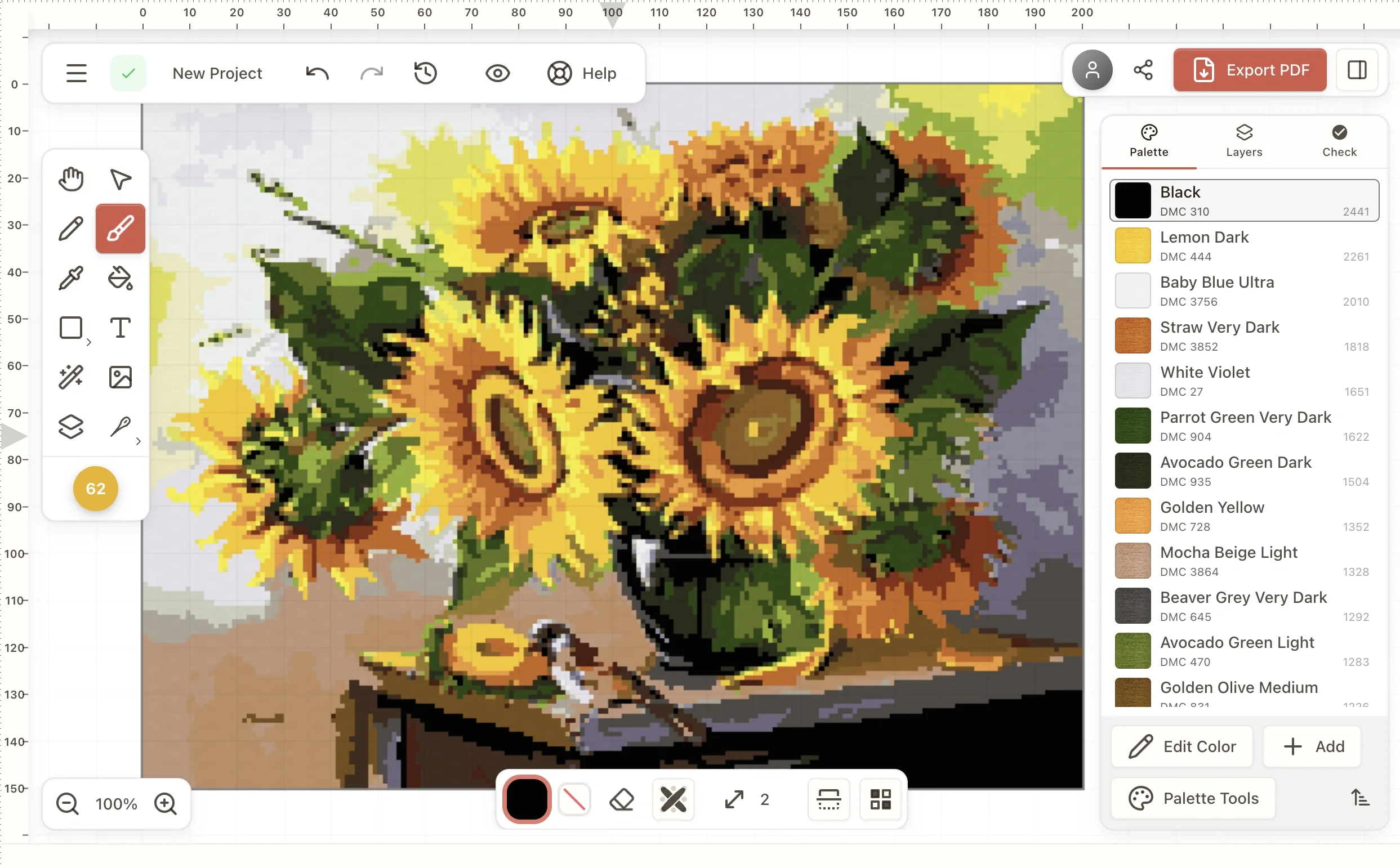
Stitchmate is a modern, web-based cross stitch design platform built for stitchers who want more control and better results than traditional desktop or browser tools. Its flagship Photo to Pattern Converter turns any image — photos, screenshots, or scanned artwork — into a stitchable chart by analyzing spatial relationships between stitches rather than just pixel colors, dramatically reducing confetti (isolated single stitches that slow down stitching). Every converted pattern gets a FLOW Score, a proprietary quality metric that estimates how enjoyable the pattern will be to stitch, updating in real time as you tweak settings. Beyond photo conversion, Stitchmate includes a full custom pattern maker for drawing stitch-by-stitch or tracing an image, an Image to Thread Palette extractor supporting 50+ floss brands, and openers for existing pattern file formats including PCStitch (.pat), Pattern Maker (.xsd), and OXS files — all viewable in-browser without installing anything. A suite of calculators helps plan projects: fabric sizing, realistic time estimates, and skein counts with safety margins. Exported PDFs are multi-page, symbol-coded, print-ready, and compatible with Pattern Keeper. Color reference charts cover DMC (489 colors) and Anchor (446 colors) with cross-brand conversion tables. Stitchmate is ideal for hobbyist and serious cross stitch designers who want a powerful, accessible alternative to legacy Windows desktop software.
Key Features
- Photo to Pattern Converter: Converts any photo into a stitchable cross stitch chart using spatial stitch analysis, producing 79% less confetti than competitors like StitchFiddle by default.
- FLOW Score Quality Metric: A proprietary score that predicts how satisfying a pattern will be to stitch, updating in real time as you adjust conversion settings before committing to a design.
- 50+ Thread Brand Support: Matches floss colors across 50+ brands including DMC, Anchor, Cosmo, Gentle Art, Madeira, Kreinik, and more, with perceptual color matching and ranked alternatives.
- Pattern File Opener: Opens PCStitch (.pat), Pattern Maker (.xsd), and OXS files in-browser on any device with quality analysis, confetti heatmaps, and PDF export — no install required.
- Project Planning Calculators: Built-in fabric, time, and thread calculators help plan every aspect of a project — from exact fabric dimensions with margins to realistic stitch-time estimates.
Use Cases
- Converting a pet or portrait photo into a detailed, low-confetti cross stitch pattern ready to stitch.
- Designing an original cross stitch chart from scratch by drawing stitch-by-stitch or tracing a reference image.
- Extracting a matched thread palette from an inspiration photo to plan a new project across 50+ floss brands.
- Opening and analyzing existing PCStitch, Pattern Maker, or OXS pattern files on a Mac, tablet, or non-Windows device.
- Planning a cross stitch project by calculating exact fabric size, estimated stitching time, and required skein counts.
Pros
- Significantly less confetti: Stitchmate's spatial stitch analysis generates 79% fewer isolated stitches than StitchFiddle under default settings, resulting in easier and more enjoyable stitching.
- No download or signup needed: All core tools run entirely in the browser — photo converter, file openers, calculators, and PDF previews — without creating an account or installing software.
- Broad thread brand coverage: With 50+ supported floss brands and cross-brand conversion tables, stitchers can work with virtually any thread collection they own.
- Pattern Keeper compatible exports: PDFs are formatted for direct use with the popular Pattern Keeper app, making the workflow from design to in-hoop stitching seamless.
Cons
- Web-only platform: Stitchmate has no desktop or mobile app, requiring a browser and internet connection for all design work — offline use is not supported.
- Niche, craft-specific tool: The platform is exclusively designed for cross stitch, offering no value to users outside of needlework or embroidery crafts.
- Advanced features may require a paid plan: While core tools are free, larger patterns and full PDF exports may be gated behind a premium tier, as suggested by 'Create your first pattern – free' messaging.
Frequently Asked Questions
Is Stitchmate completely free to use?
Stitchmate's core tools — photo conversion, pattern preview, file openers, and calculators — are free with no signup required. Some advanced features such as full PDF exports or larger pattern sizes may require a paid plan.
What is a FLOW Score?
The FLOW Score is Stitchmate's proprietary quality metric that predicts how satisfying a cross stitch pattern will be to stitch. It accounts for confetti density and stitch flow, updating in real time as you adjust your conversion settings.
What thread brands does Stitchmate support?
Stitchmate supports 50+ thread brands including DMC, Anchor, Cosmo, Gentle Art, Classic Colorworks, Kreinik, Madeira, Presencia, Sullivans, WDW, J&P Coats, and CXC, with perceptual color matching and ranked alternatives.
Can I open my existing pattern files in Stitchmate?
Yes. Stitchmate can open PCStitch (.pat), Pattern Maker (.xsd), and OXS files directly in the browser on any device, with quality analysis, confetti heatmaps, and PDF export — no installation needed.
Are Stitchmate exports compatible with Pattern Keeper?
Yes. Stitchmate exports multi-page, symbol-coded, print-ready PDFs that are fully compatible with the Pattern Keeper app for use while stitching.