

About
Triangle IP offers the TIP Tool™, a comprehensive patent lifecycle management solution designed for startups, enterprises, individual inventors, and patent practitioners. The platform starts with a customizable invention disclosure form that lets teams capture ideas quickly and expand them over time. From there, users can brainstorm collaboratively in real time — editing, commenting, and tracking changes across distributed teams. The tool provides full patent pipeline visibility, allowing stakeholders to follow ideas from initial disclosure through filing and beyond, with instant notifications at every stage. Advanced case analytics and cost estimation features help IP teams predict patent success rates and future expenses, enabling smarter budgeting and prioritization. Automatic USPTO status updates — including support for unpublished applications via Private PAIR — eliminate manual tracking. Counsel and examiner statistics give practitioners deeper insight into examiner tendencies and law firm performance, enabling better prosecution strategies. Role-based dashboards surface delays, highlight top innovators, and provide organization-wide visibility at a glance. Security is foundational: all portfolio data is encrypted on AWS US servers, payments are handled by Stripe, and no passwords or credit card details are stored by Triangle IP. The TIP Tool is suitable for organizations of any size looking to reduce legal fees, engage innovators, and build a more disciplined IP strategy.
Key Features
- Invention Disclosure Capture: A customizable form lets teams record ideas quickly, add documents, sort and filter submissions, and expand details over time to capture enterprise-wide innovation.
- Real-Time Collaboration: Team members can brainstorm, edit, comment, and discuss ideas simultaneously from anywhere, with full change tracking showing who made each update.
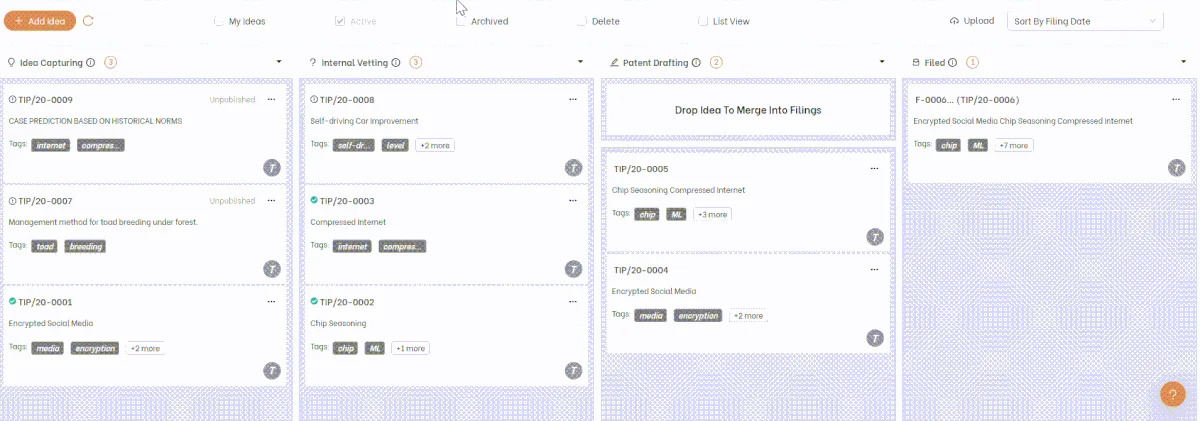
- Patent Pipeline Visibility: Track every idea from disclosure through filing with stage-based status tracking, stakeholder notifications, and workflow acceleration tools.
- Case Analytics & Cost Estimation: Predict patent success probabilities and future legal costs to make data-driven decisions about which inventions are worth pursuing.
- Automatic USPTO Updates & Examiner Stats: Receive direct status alerts for published and unpublished applications, plus access counsel and examiner analytics to build smarter prosecution strategies.
Use Cases
- A startup founder uses Triangle IP to capture invention disclosures from the engineering team, prioritize ideas based on analytics, and track patent filings without needing a dedicated IP manager.
- An enterprise innovation manager deploys the TIP Tool across multiple business units to create a centralized patent pipeline, identify top innovators, and report IP activity to leadership via role-based dashboards.
- A patent attorney uses examiner statistics and counsel analytics to tailor prosecution strategies for each USPTO examiner, improving allowance rates and reducing client costs.
- An individual inventor uses the platform to document invention details securely, estimate potential patent costs, and collaborate with an outside patent attorney on prosecution.
- An IP team uses cost estimation and case analytics to decide which pending inventions justify continued patent investment and which should be abandoned to optimize their legal budget.
Pros
- End-to-End Patent Lifecycle Coverage: Handles everything from initial idea capture through USPTO tracking in one integrated platform, eliminating scattered spreadsheets and email chains.
- Strong Security & Privacy: Portfolio data is fully encrypted on AWS US servers with no stored passwords, giving IP-sensitive organizations confidence in their data safety.
- Data-Driven Decision Making: Built-in analytics on costs, examiner tendencies, and case outcomes help teams prioritize patents strategically and reduce unnecessary legal spend.
- Scalable for All Organization Sizes: Role-based dashboards and a free trial make the tool accessible to individual inventors and startups while supporting enterprise-scale patent portfolios.
Cons
- Niche Use Case: The tool is purpose-built for patent and IP management, so organizations without active patent activity will find limited value in the platform.
- US-Centric USPTO Integration: The automatic status update and Private PAIR features are tied to the USPTO, which may limit utility for teams focused on international patent filings.
- Learning Curve for Non-IP Teams: Inventors without prior patent experience may need onboarding support to fully leverage analytics features like examiner statistics and cost prediction.
Frequently Asked Questions
Who is the TIP Tool designed for?
The TIP Tool is designed for individual inventors, startup founders, enterprise innovation managers, and patent practitioners (attorneys and agents) who need to manage patent workflows collaboratively.
Is there a free version of Triangle IP?
Yes, Triangle IP offers a free trial so users can explore the platform before committing to a paid plan. Pricing tiers are available on their website.
How does Triangle IP keep my patent data secure?
All portfolio data is encrypted and stored on AWS servers in the US. Triangle IP does not store passwords or credit card details, and even their own developers cannot access your encrypted portfolio data.
Can Triangle IP track unpublished patent applications?
Yes, the TIP Tool supports Private PAIR integration, which allows tracking of unpublished USPTO applications in addition to published ones.
Does Triangle IP integrate with USPTO directly?
Yes, the platform provides automatic USPTO status updates, sending direct alerts when application statuses change so users don't need to manually check for updates.