
About
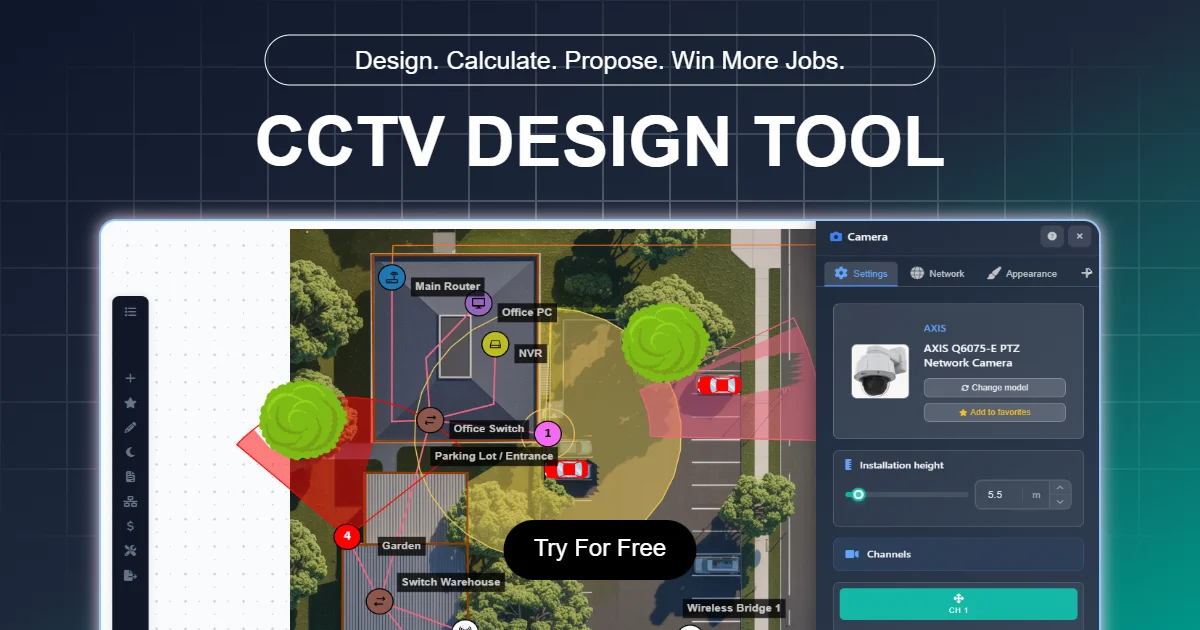
CCTV Design Tool is a professional-grade, browser-based software platform built specifically for security installers, system integrators, and enterprise security teams. It streamlines the entire CCTV project workflow — from initial site survey to signed contract — all within a single browser tab. Users can place cameras on real floor plans or satellite maps and instantly visualize field-of-view (FOV) coverage alongside DORI (Detection, Observation, Recognition, Identification) zones. The interactive editor updates pixel-per-meter (PPM) density calculations in real time as installers adjust mounting height, zoom, and angle settings. The platform includes an extensive device library with 23,000+ security camera models (Hikvision, Axis, Dahua, Bosch, and 150+ additional brands) and 18,000+ network devices such as NVRs, PoE switches, and access control panels. As cameras are placed and cables are routed, the Bill of Materials (BOM) builds itself automatically. Completed designs can be exported as branded, client-ready PDF proposals complete with coverage maps, an itemized BOM, and pricing details — giving installers a competitive edge when bidding on commercial projects. Additional tools include HDD, FOV, and UPS calculators. CCTV Design Tool offers a free-forever plan with no credit card or time limit, plus paid plans for enterprise teams requiring advanced features, branding, and multi-user collaboration. It is trusted by 12,000+ installers and 40+ enterprise teams worldwide.
Key Features
- Real-Time FOV & DORI Simulation: Visualize camera field-of-view and DORI zones live on floor plans or satellite maps, with PPM pixel density updating instantly as you adjust angle, zoom, and mounting height.
- 23,000+ Camera & Device Library: Search and place from a database of 23,000+ security cameras and 18,000+ network devices from Hikvision, Axis, Dahua, Bosch, and 150+ other manufacturers.
- Automatic Cable Routing & BOM: Route cables across your design and watch the Bill of Materials build itself automatically with accurate length calculations and component lists.
- Branded PDF Proposals: Export client-ready PDF proposals with coverage maps, itemized BOMs, and pricing — helping installers win bids with professional-looking documents.
- Built-In Calculators: Includes dedicated FOV, HDD storage, and UPS calculators to support accurate system sizing and planning without switching between tools.
Use Cases
- Security installers creating professional, coverage-mapped proposals to win commercial CCTV bids over competitors using hand-drawn sketches.
- System integrators speccing exact camera models from a 23,000+ device library and auto-generating an accurate Bill of Materials for procurement.
- Enterprise security teams planning large-scale surveillance deployments across multiple sites using collaborative design tools.
- CCTV contractors conducting virtual site surveys by placing cameras on satellite maps and calculating precise cable lengths before visiting the site.
- Manufacturers and suppliers showcasing their camera product lines within a professional design tool used by 12,000+ active installers.
Pros
- Completely Free to Start: The free-forever plan requires no credit card and no installation — users can complete a full real-project design workflow immediately from the browser.
- Massive Device Database: With 23,000+ cameras and 18,000+ network devices from 150+ brands, installers can spec exact products rather than generic placeholders.
- End-to-End Workflow in One Tab: From camera placement and cable routing to BOM generation and PDF export, the entire installation planning workflow lives in a single browser-based interface.
- Globally Trusted: Used by 12,000+ installers and 40+ enterprise teams in 75+ countries, with 649 verified professional reviews lending strong credibility.
Cons
- Niche Use Case: Designed exclusively for CCTV and physical security system planning — not applicable to general AV, IT infrastructure, or other design disciplines.
- Advanced Features Require Paid Plan: Enterprise-level capabilities such as multi-user collaboration, advanced branding, and additional project slots are gated behind paid subscription tiers.
- Browser-Only Platform: There is no offline or desktop application, so users must have a reliable internet connection to access their designs and projects.
Frequently Asked Questions
Is CCTV Design Tool really free?
Yes. There is a free-forever plan that requires no credit card and has no time limit. You can complete real project designs, including camera placement, BOM generation, and PDF export, at no cost.
Do I need to install any software?
No. CCTV Design Tool is entirely browser-based. You can start designing in seconds without downloading or installing anything.
Which camera brands are supported?
The platform includes 23,000+ camera models from 150+ manufacturers, including Hikvision, Axis, Dahua, and Bosch, with regular additions and an option to request missing models.
What is DORI and how does the tool simulate it?
DORI stands for Detection, Observation, Recognition, and Identification — four distance-based image quality zones defined by EN 62676-4. The tool overlays these zones on your design in real time, updating as you change camera settings.
Is there an enterprise or team plan available?
Yes. CCTV Design Tool offers enterprise plans for teams requiring multi-user access, advanced branding, and additional features. There are also supplier and manufacturer partnership options.