

About
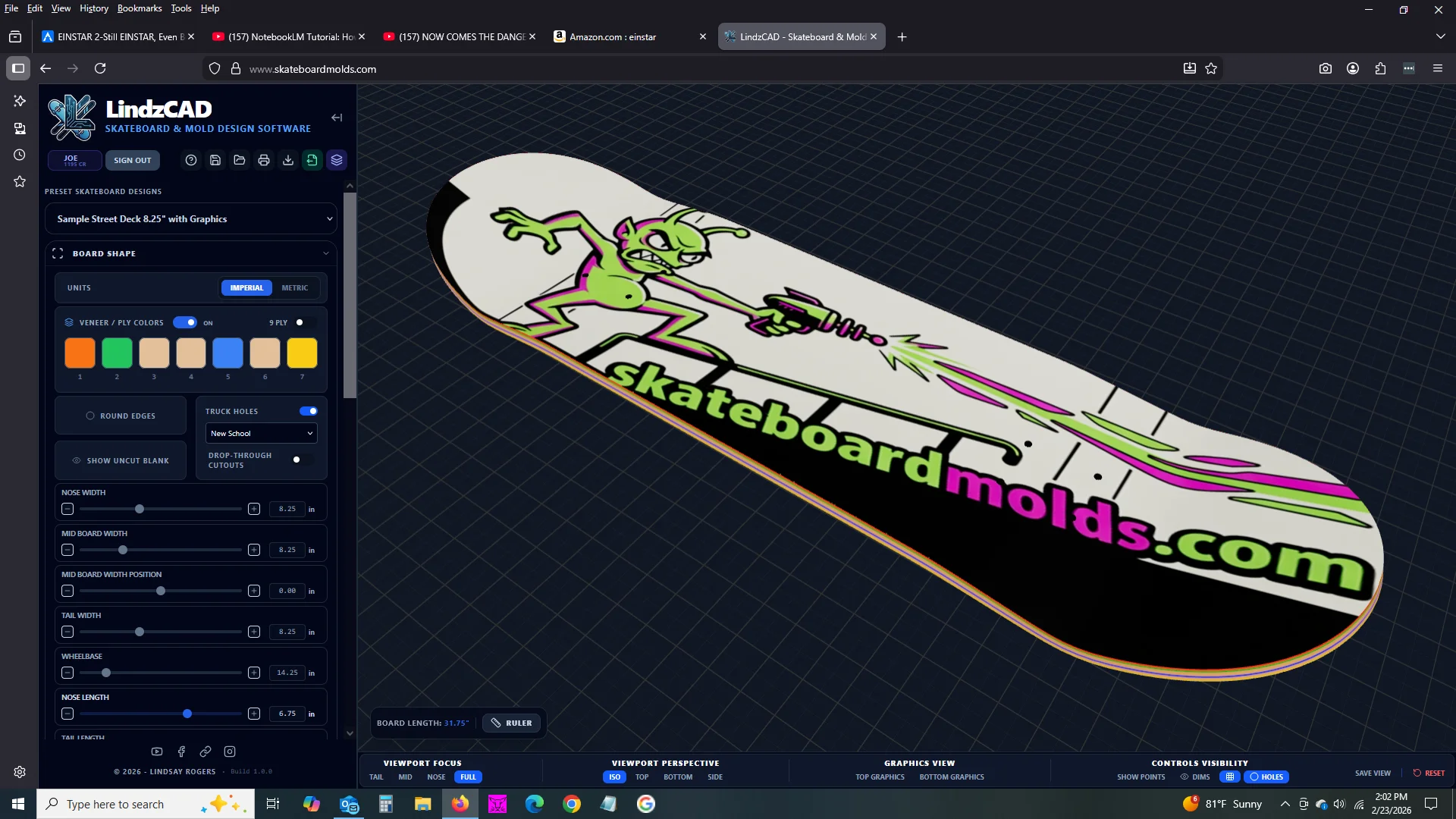
LindzCAD offers two fully-loaded applications—LindzCAD Skate and LindzCAD Ski & Snowboard—purpose-built for board sports enthusiasts, independent makers, and small manufacturers who want to go from concept to production without deep engineering expertise. The software provides over a dozen preset board profiles (street, cruiser, longboard, old school, pintail, downhill, and more) that can be customized down to thousandths of an inch using sliders, specification fields, or click-drag control handles in a high-resolution 3D viewport. Designers can sculpt every aspect of a board's geometry—nose and tail widths, wheelbase, concave depth, kick angles, camber or rocker arcs, and drop-deck depth—with changes reflected instantly in the 3D model. The integrated AI graphics engine lets users describe a graphic vision in plain language (or via voice), generating artwork that wraps around the board's actual curvature and perspective. For production workflows, LindzCAD supports silkscreen templates with PMS spot colors, color separations, spreads, registration marks, and AI logo generation constrained to the chosen color palette. The mold design module shows exactly how your deck geometry translates to CNC-machined mold surfaces before ordering. Paid users can also export OBJ and STL files for their own CNC machines. Scene and lighting controls help produce professional product shots, while annotation tools and printable PDF spec sheets streamline communication with manufacturers.
Key Features
- Real-Time 3D Board Shape Design: Control nose width, tail width, wheelbase, mid-board position, round edges, and drop-through cutouts via sliders or spec entry, with every change reflected instantly in a high-resolution 3D viewport.
- Concave, Kicks & Camber Sculpting: Fine-tune concave depth, nose and tail kick angles, camber or rocker arcs, and drop-deck depth, with live cross-section and profile visualizations to dial in your exact ride feel.
- AI Graphic & Logo Generation: Type or speak a description and watch AI-generated artwork appear on your board in seconds, accurately wrapped to the board's curvature. Upload your own art or combine both for full creative control.
- Production-Ready Silkscreen Templates: Generate silkscreen files with PMS spot colors, AI imagery constrained to the chosen palette, color separations, spreads, and registration marks sized to your exact board dimensions.
- CNC Mold Export: Toggle to mold view to inspect how your design translates to CNC surfaces, then export OBJ and STL files (paid) or order a mold directly through SkateboardMolds.com.
Use Cases
- A skateboard enthusiast designing their first custom deck, using preset street profiles and AI-generated graphics to create a unique board before ordering a CNC mold.
- A small-batch skateboard brand preparing production-ready silkscreen artwork with PMS color separations and registration marks for a limited run of custom decks.
- A ski or snowboard maker iterating on camber profiles and concave geometry in real time, exporting STL files to test on their own CNC machine.
- A board sports retailer offering customers a custom board design experience, using LindzCAD's 3D viewer and AI graphics to visualize personalized orders.
- A product designer or industrial arts student learning board geometry principles through hands-on digital prototyping and real-time 3D feedback.
Pros
- No engineering background required: Preset profiles and intuitive slider controls let beginners jump straight into designing production-quality boards without prior CAD experience.
- End-to-end workflow in one tool: From initial shape concept to AI graphics, silkscreen print files, and CNC-ready mold exports, LindzCAD handles the entire design-to-production pipeline.
- AI-powered graphics on real board geometry: Generated artwork is rendered with accurate perspective and curvature on the 3D model, giving a true preview of what the finished graphic will look like.
Cons
- Niche use case: Purpose-built for board sports only (skateboards, skis, snowboards), making it irrelevant for general product design or other industries.
- OBJ/STL export is paywalled: Exporting files for your own CNC machine requires the paid version, which may be a barrier for hobbyists just experimenting.
- Mobile app not yet available: A mobile version is listed as 'coming soon,' so full design work is currently limited to desktop environments.
Frequently Asked Questions
What types of boards can I design with LindzCAD?
LindzCAD supports skateboards (street, cruiser, longboard, old school, pintail, downhill, and more) via LindzCAD Skate, and skis and snowboards via LindzCAD Ski & Snowboard. Each application includes preset profiles for quick starts.
Do I need CAD or design experience to use LindzCAD?
No. The software is designed for makers at all skill levels. You can start from a preset, adjust sliders or enter measurements, and generate graphics by simply typing or speaking a description—no prior CAD or graphic design knowledge needed.
Can I export files to use with my own CNC machine?
Yes. The paid version of LindzCAD exports OBJ and STL files compatible with most CNC workflows. You can also order CNC-machined molds directly through SkateboardMolds.com.
How does the AI graphic generation work?
Type a description into the AI prompt window or click the microphone and describe your vision out loud. The AI generates artwork that is then mapped onto your 3D board model with accurate curvature and perspective. You can also upload your own artwork and combine it with AI-generated elements.
Is LindzCAD suitable for small-batch production runs?
Yes. The silkscreen module outputs production-ready files with PMS spot colors, color separations, spreads, and registration marks—ideal for small-batch and custom print runs. CNC mold export (paid) also supports direct manufacturing.