
About
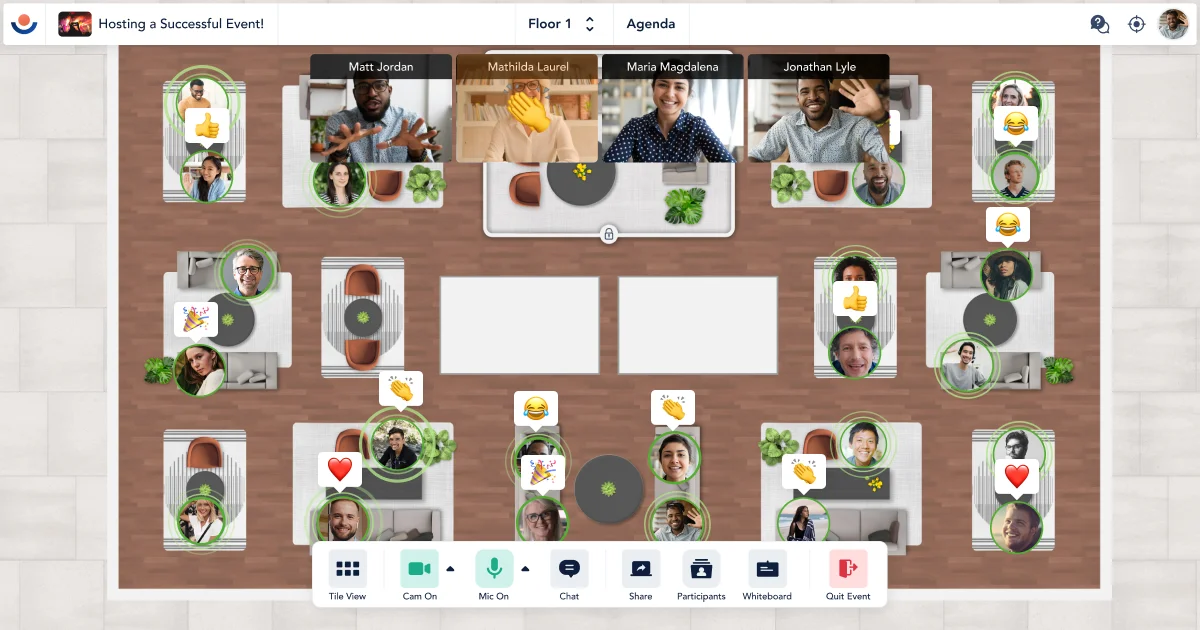
Remo is a comprehensive virtual event platform designed to make online gatherings feel as natural and engaging as in-person events. Unlike traditional video conferencing tools, Remo uses immersive floor plan layouts where attendees can freely move between virtual tables, spark spontaneous conversations, and network authentically. The platform supports a wide range of event formats including virtual conferences, webinars, career fairs, trade shows, exhibitions, education fairs, and community events. Hosts can leverage powerful presentation tools such as polls, Q&A, hand raises, closed captions, simulive content, RTMP livestreaming, and sound effects to keep audiences engaged. Remo's AI Matchmaking feature intelligently connects attendees based on shared interests and goals, surfacing personalized talking points to encourage meaningful conversations. Event organizers benefit from built-in registration and ticketing with custom forms, multiple ticket types, revenue tracking, instant payouts, and low ticketing fees. Management tools include live broadcast, announcements, timers, lobby/waiting room controls, locked tables, guest assignment, and detailed analytics and integrations to measure ROI and streamline post-event workflows. Remo caters to associations, higher education institutions, enterprises, startups, SMEs, HR departments, and law firms. Its proven results include a 70% membership growth for Network My Club and a 60% attendance boost for NMIMS Student Council compared to Zoom.
Key Features
- Immersive Virtual Networking: Interactive floor plans with virtual tables allow attendees to move freely and have natural, spontaneous conversations—just like at an in-person event.
- AI Matchmaking: Intelligently pairs attendees based on shared interests and goals, providing personalized talking points to facilitate meaningful connections.
- Webinar & Presentation Tools: Engage audiences with polls, Q&A, hand raises, simulive content, closed captions, RTMP livestream, sound effects, and multiple screen shares.
- Registration & Ticketing: Fully customizable registration forms, multiple ticket types, instant payouts, low ticketing fees, and revenue tracking to maximize event ROI.
- Analytics & Integrations: Deep event analytics and third-party integrations help organizers measure performance, track attendance, and streamline post-event workflows.
Use Cases
- Hosting virtual professional conferences with breakout networking sessions and keynote presentations for associations and enterprises.
- Running interactive webinars with live polls, Q&A, and audience reactions to maximize attendee engagement and learning outcomes.
- Organizing virtual career fairs and job fairs where recruiters and candidates can network freely across virtual booths and tables.
- Facilitating virtual trade shows and exhibitions where exhibitors can showcase products and connect with potential buyers in real time.
- Running university and higher education virtual events, including orientation fairs and alumni networking nights, to build community engagement online.
Pros
- Authentic Networking Experience: Free guest movement and virtual tables closely replicate real-world event networking, making online events feel far more engaging than standard video calls.
- All-in-One Platform: Covers the full event lifecycle—from registration and ticketing to live event management, networking, and post-event analytics—eliminating the need for multiple tools.
- AI-Powered Connections: The AI matchmaking engine helps attendees find the most relevant connections quickly, increasing the value of every event.
- Proven Engagement Results: Documented case studies show significant boosts in membership growth and event attendance compared to competitor platforms like Zoom.
Cons
- Learning Curve for New Users: The immersive floor plan model is different from standard video conferencing tools and may require onboarding time for both hosts and attendees.
- Pricing Can Escalate for Large Events: Costs may increase significantly for large-scale events with many attendees or advanced feature requirements, making it less accessible for budget-constrained organizers.
- Web-Only Platform: Remo operates primarily through a web browser with no dedicated native mobile or desktop apps, which may limit accessibility for some users.
Frequently Asked Questions
What types of events can I host on Remo?
Remo supports a wide variety of virtual events including conferences, webinars, career fairs, trade shows, exhibitions, education fairs, community events, and hybrid events.
How does Remo's AI Matchmaking work?
Remo's AI Matchmaking algorithm analyzes attendee profiles and interests to suggest personalized connections and generate relevant talking points, helping attendees network more effectively.
Does Remo support ticketing and paid events?
Yes. Remo includes a built-in registration and ticketing system with custom registration forms, multiple ticket types, instant payouts, and revenue tracking with low ticketing fees.
Can Remo be used for hybrid events?
Yes, Remo offers hybrid event support, allowing you to engage both in-person and remote attendees simultaneously through its platform.
What integrations does Remo support?
Remo provides analytics and integrations to connect with other tools and streamline workflows. Specific integrations can be explored in the Analytics & Integrations section of the platform.