

About
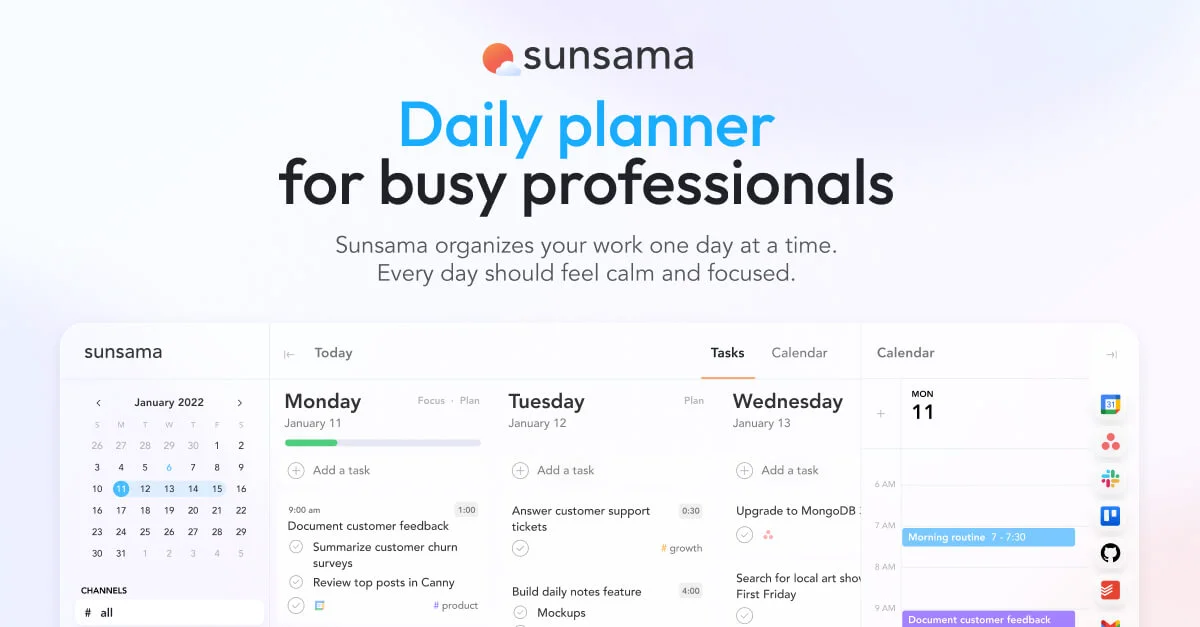
Sunsama is a purpose-built digital daily planner for modern professionals who want to balance productivity with well-being. It bridges the gap between project management tools, calendars, and task lists by aggregating everything into one clear, focused daily plan. Each morning, Sunsama guides users through a structured planning ritual: pull in tasks from connected apps, time-block focus sessions on the calendar, and set realistic daily goals aligned with weekly objectives. Throughout the day, it provides Pomodoro-style timers, break reminders, and distraction-muting features to maintain flow and energy. At day's end, Sunsama automatically surfaces a summary of accomplishments, time-use analytics, and progress toward weekly goals — helping users close the loop without guilt. Key integrations include Google Calendar, Outlook, Apple Calendar, Asana, Trello, Jira, Slack, Microsoft Teams, Gmail, and Zapier (9,000+ app connections). It also supports bi-directional calendar sync and offers enterprise-grade SOC2 compliance and SAML/SSO. Sunsama is ideal for founders, executives, freelancers, and knowledge workers who struggle with context-switching, unfinished to-do lists, and work-life imbalance. It does not try to be another project manager — instead it acts as the daily operating layer on top of the tools you already use.
Key Features
- Guided Daily Planning Ritual: Start each morning with a structured workflow to pull in tasks, set priorities, and time-block a realistic day on your calendar.
- Unified Task & Calendar View: See all your tasks and meetings side by side in one place, with drag-and-drop time blocking directly onto your schedule.
- Deep Work Focus Tools: Built-in Pomodoro timers, app-muting, and automatic break reminders help you protect focus time and maintain energy throughout the day.
- Cross-Tool Integrations: Pulls tasks from Asana, Jira, Trello, Gmail, Slack, and Teams, and connects to 9,000+ apps via Zapier for a single unified work list.
- End-of-Day Review & Analytics: Automatically tracks daily wins, time usage, and weekly goal progress so you can close the day feeling accomplished and informed.
Use Cases
- A founder uses Sunsama each morning to pull in GitHub issues, Slack follow-ups, and calendar meetings into a single prioritized daily plan, then time-blocks focus sessions to ship features without losing track of meetings.
- A remote knowledge worker connects Sunsama to Asana and Gmail to convert emails and project tasks into a realistic daily schedule, ending each day on time by respecting the workload limits Sunsama surfaces.
- An executive uses Sunsama's weekly objectives and daily review features to align day-to-day tasks with strategic priorities, reviewing time-use analytics each Friday to optimize the following week.
- A freelancer with multiple clients uses Sunsama's Pomodoro timer and distraction-muting to protect deep work blocks, while Zapier automations route new client requests directly into the daily task list.
- A team lead rolls out Sunsama enterprise-wide to give all team members a consistent daily planning ritual, with SOC2 compliance and SSO satisfying the company's security requirements.
Pros
- Holistic Daily Workflow: Combines planning, time-blocking, focus, and end-of-day review into one cohesive system, eliminating the need to juggle multiple productivity apps.
- Wide Integration Ecosystem: Connects with nearly every major work tool — project managers, calendars, email, and chat — keeping everything in sync without manual entry.
- Work-Life Balance Focus: Encourages realistic daily planning and enforces end-of-day cutoffs, actively helping users avoid overcommitting and burning out.
- Enterprise-Ready Security: SOC2 compliance and SAML/SSO support make it straightforward for IT and security teams to approve for organizational use.
Cons
- Paid Subscription Only: After the 14-day free trial there is no free tier, which may be a barrier for individuals or small teams on tight budgets.
- Learning Curve for New Habits: Getting full value requires committing to Sunsama's daily planning rituals each morning and evening, which takes time to build as a routine.
- Not a Full Project Manager: Sunsama is a daily planning layer, not a replacement for Asana or Jira — teams still need a dedicated project management tool alongside it.
Frequently Asked Questions
What makes Sunsama different from other task managers?
Sunsama is not just a to-do list — it is a structured daily planner that combines task management, calendar time-blocking, and end-of-day reviews into one guided workflow designed specifically to prevent burnout and improve focus.
Which tools does Sunsama integrate with?
Sunsama integrates with Google Calendar, Outlook, Apple Calendar, Asana, Trello, Jira, GitHub, Todoist, Gmail, Slack, Microsoft Teams, and Zapier (9,000+ apps), allowing you to pull all your work into one daily plan.
Is there a free plan or trial?
Sunsama offers a 14-day free trial with no credit card required. After the trial it is a paid subscription; there is no permanent free tier.
Can I use Sunsama for personal tasks as well as work?
Yes. Sunsama supports both work and personal task management, letting you build a realistic daily plan that accounts for everything on your plate — not just professional obligations.
Is Sunsama suitable for enterprise teams?
Yes. Sunsama is SOC2 compliant and offers SAML/SSO on its enterprise tier, making it easy for IT and security teams to approve for company-wide deployment.