

About
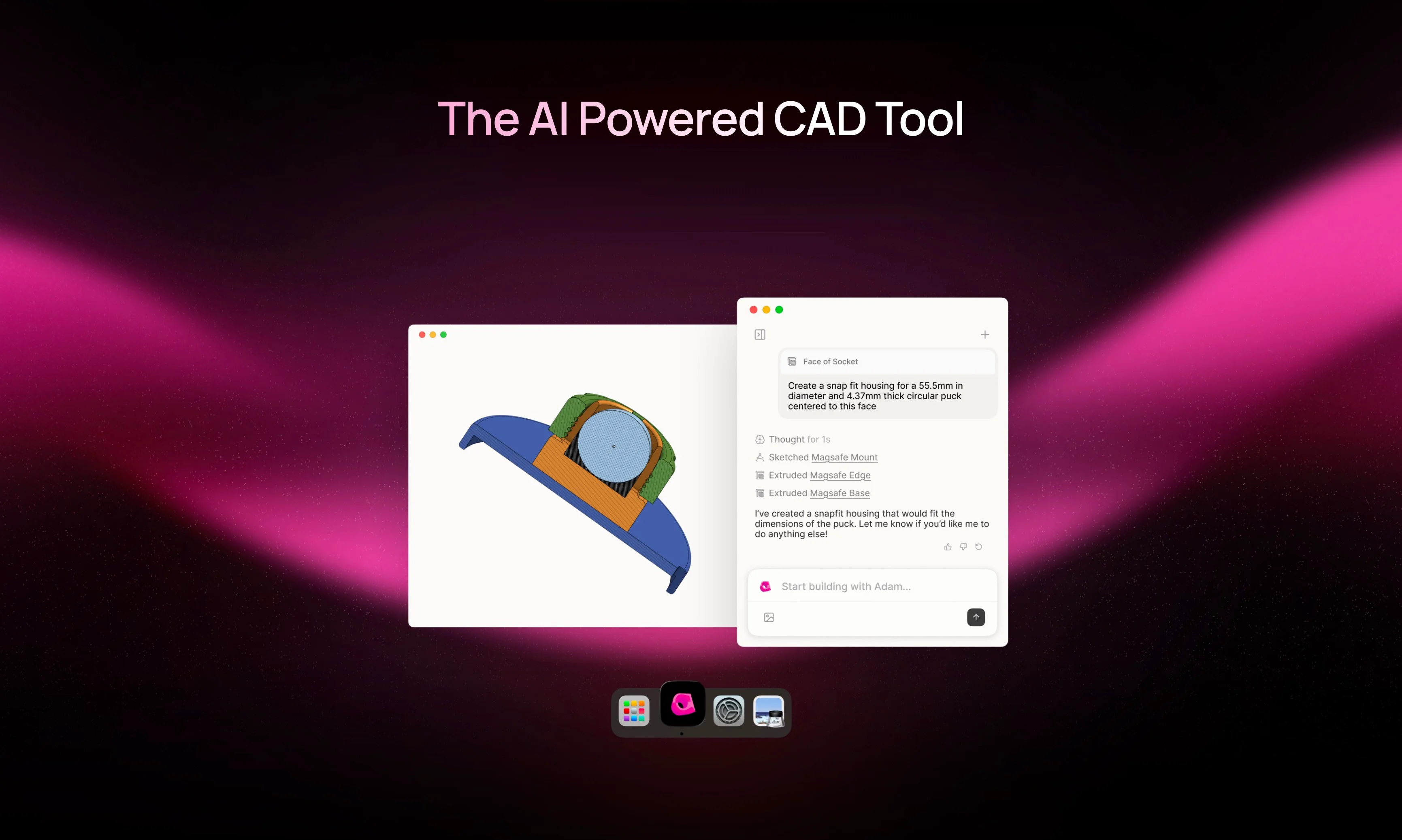
Adam is an AI-native CAD agent designed to transform how mechanical engineers and hardware builders interact with their CAD software. Rather than navigating complex menus and performing repetitive granular clicks, users simply describe what they want and Adam executes the task within their existing CAD environment via a browser extension. The tool addresses a longstanding pain point in the industry: CAD software that has accumulated decades of complexity without meaningfully improving usability. Adam bridges that gap by acting as an intelligent layer on top of leading CAD platforms, making advanced design accessible even to those who find traditional CAD tools intimidating. Key capabilities include Part Editing (converting natural language commands into precise geometry changes), Selection Context (using selected CAD elements as context to intelligently generate new features), Feature Tree Optimization (detecting and merging duplicate features to produce cleaner, more robust models), and Parametrization (converting ad-hoc models into parametric designs with cascading variables). Adam is particularly well-suited for mechanical engineers, product designers, hardware startups, and makers who want to accelerate their design cycles without sacrificing precision. Its approach — described by notable backers as "vibeCADing" — democratizes 3D modeling by letting users focus on intent rather than software mechanics. Models can be exported in standard formats like STL for 3D printing and manufacturing workflows.
Key Features
- Prompt-Based Part Editing: Replace complex click-heavy CAD workflows with a single natural language prompt to edit or create parts instantly.
- Selection Context Awareness: Uses the currently selected CAD geometry as context to intelligently interpret high-level commands and generate new features.
- Feature Tree Optimization: Automatically identifies duplicate or redundant features in your design tree and merges them for a cleaner, more maintainable model.
- Parametric Model Conversion: Converts static, ad-hoc models into fully parametric designs where distinct variables cascade throughout the entire design.
- CAD Platform Integration via Extension: Works inside your existing preferred CAD platform through a browser extension, requiring no migration to a new tool.
Use Cases
- Mechanical engineers rapidly prototyping hardware components without manually navigating complex CAD menus
- Hardware startups iterating on product designs faster by replacing repetitive CAD clicks with natural language prompts
- Makers and 3D printing enthusiasts generating precise parametric models for export as STL files
- CAD users cleaning up messy feature trees by automatically detecting and merging duplicate features
- Design teams converting legacy static models into fully parametric designs to support future engineering changes
Pros
- Dramatically Speeds Up CAD Workflows: Replaces tedious, repetitive manual operations with simple prompts, cutting down design iteration time significantly.
- Works Inside Existing CAD Tools: No need to abandon familiar software — Adam enhances the platforms engineers already use rather than replacing them.
- Lowers the CAD Learning Curve: Natural language input makes advanced CAD operations accessible to makers and builders who find traditional interfaces complex.
- Backed by Leading Voices in Tech: Strong endorsements from Y Combinator partners and prominent founders validate its real-world impact and potential.
Cons
- Limited Publicly Available Pricing Info: Pricing details are not clearly listed on the website; users must book a demo or sign up to learn about plans.
- Dependent on Supported CAD Platforms: Adam's capabilities are tied to whichever CAD platforms it currently integrates with, which may not include every user's preferred tool.
- Early-Stage Product: As a newer AI-native tool, it may still have feature gaps or reliability considerations compared to mature CAD software.
Frequently Asked Questions
What CAD platforms does Adam support?
Adam integrates with popular CAD platforms via a browser extension. The specific list of supported platforms is available on their website or through a demo booking.
How do I get started with Adam?
You can try Adam by visiting adam.new, installing the Adam browser extension, and connecting it to your CAD platform. A demo can also be booked for a guided introduction.
Can Adam export files for 3D printing?
Yes, Adam can export models in standard formats such as STL, making it compatible with 3D printing and manufacturing workflows.
Is Adam suitable for professional mechanical engineers or just hobbyists?
Adam is designed for both professional mechanical engineers who want to accelerate their workflows and makers or hobbyists who find traditional CAD tools too complex.
What is parametrization in Adam?
Parametrization is a feature that converts ad-hoc, static CAD models into parametric designs by setting distinct variables that automatically cascade and update throughout the entire model.